Learn what is phishing, how phishing attacks work, types of phishing scams, real-world examples, and proven strategies to protect yourself from phishing email threats and phishing links.
Table of Contents
- What is Phishing: Definition & Basics
- How Does Phishing Work: The Mechanics
- Types of Phishing Attacks Explained
- Phishing Email vs Regular Spam
- Real-World Phishing Scenarios
- Why Do Phishing Attacks Happen
- How to Protect Yourself from Phishing
- How to Recognize a Phishing Email
- Conclusion
What is Phishing: Definition & Understanding the Threat
Phishing is a cybersecurity crime where attackers use deceptive emails, messages, or websites to trick you into revealing sensitive information. When someone asks, “what is phishing email,” it’s important to understand this simple definition first: what is phishing is a fraudulent attempt to steal your personal data by impersonating trusted organizations.
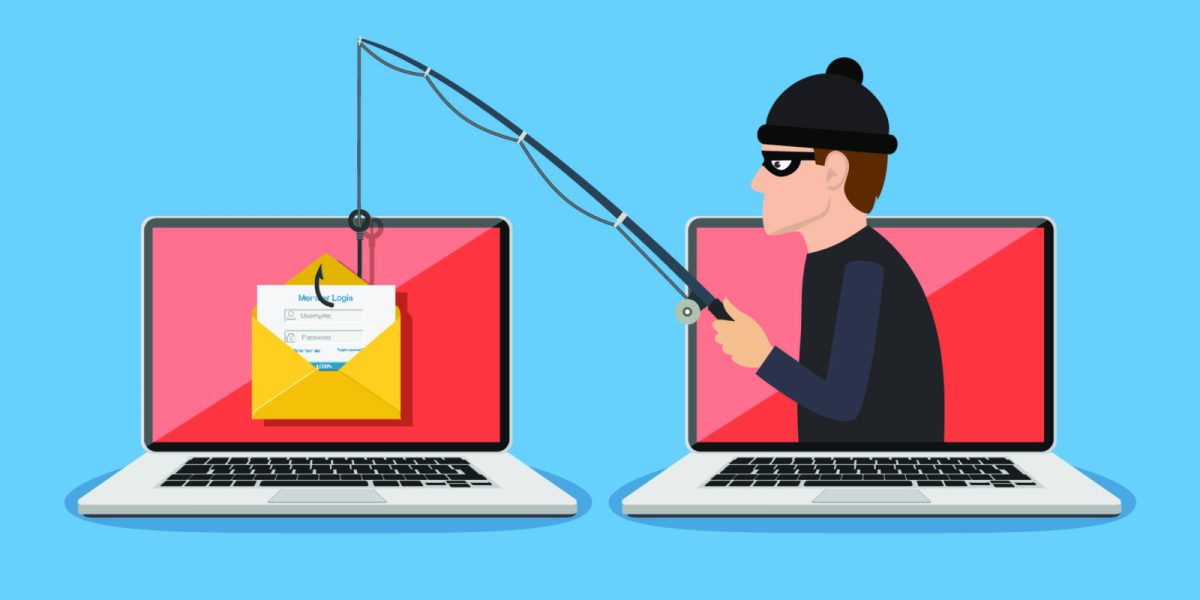
The term “phishing” itself comes from the fishing analogy because phishing attack uses bait to catch victims. Just like a fisherman casts a wide net hoping to catch fish, cybercriminals send thousands of phishing email hoping someone will fall for their trap. What is a phishing attack in essence? It’s social engineering combined with technical deception.
Think of what is a phishing email like this: You receive a message that appears to come from your bank, asking you to “verify your account” or “confirm your details.” The what is phishing scam works because it looks legitimate and creates urgency, making you more likely to click without thinking.
⚠ Key Point: Phishing is successful because it exploits human psychology rather than just technical vulnerabilities. What is phishing at its core? It’s manipulation with a criminal intent.
How Does Phishing Work: The Step-by-Step Process
Understanding how phishing attacks work helps you recognize and avoid them. Let me break down the phishing attack process into simple steps.
The Phishing Attack Cycle (Visual Breakdown)
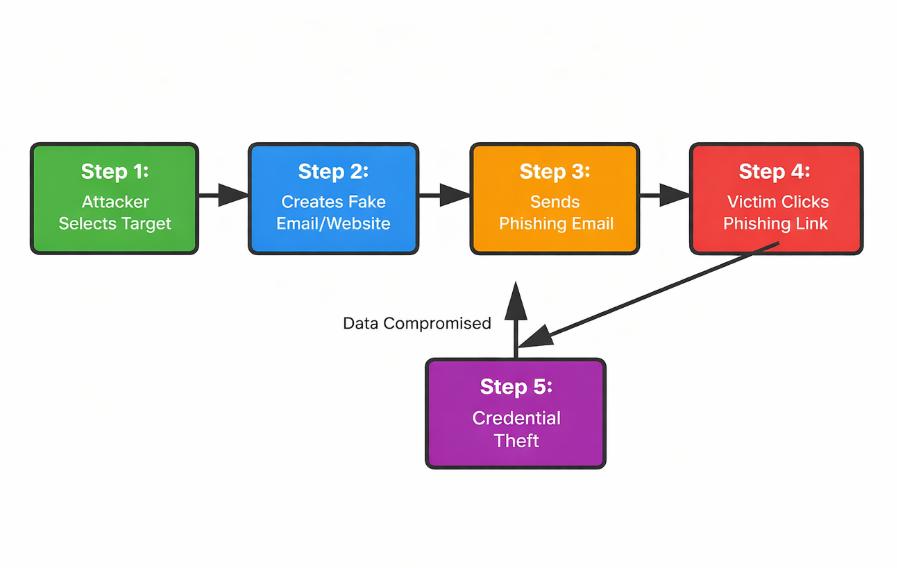
Now let’s understand each step in detail:
🕵️♂️ Step 1: Attacker Identifies Target – Cybercriminals research their victims. They might use LinkedIn to find employees of a specific company or purchase email lists from data breaches. What is a phishing attack targeting? Usually people with access to valuable information or money.
✉️ Step 2: Fake Communication Creation – The attacker creates a convincing replica of a legitimate email or website. How does phishing work at this stage? They copy logos, exact email addresses, and familiar language. A phishing email might look like it’s from your bank’s fraud department or your company’s HR team.
📢 Step 3: Mass Distribution – The phishing email is sent to thousands of potential victims. What is a phishing attack strategy? Cast a wide net because even if 1% of recipients fall for it, that’s still hundreds of compromised accounts.
🖱️ Step 4: The Click – When you click the phishing link, you’re directed to a fake website that looks identical to the real one. This is where what is phishing becomes dangerous to your data.
🔓 Step 5: Data Theft – You enter your credentials thinking you’re logging into a legitimate site, but you’re actually handing them over to criminals. What is a phishing attack’s ultimate goal? Stealing your passwords, credit card numbers, or identity information.
Types of Phishing Attacks: A Comprehensive Breakdown
Not all phishing attacks work the same way. Understanding the different types helps you recognize threats. Let me explain what is phishing in different forms:
1. Email Phishing (Most Common)
What is email phishing? It’s the traditional approach where attackers send fraudulent emails. Example: You receive an email claiming to be from PayPal asking you to confirm your account details. The email looks authentic, has correct branding, but the link directs you to a fake site.
💡 Real Example: “Your account will be suspended in 24 hours unless you verify your information. Click here.” This creates urgency, a classic phishing email tactic.
2. Spear Phishing
What is spear phishing? It’s targeted phishing where attackers customize messages for specific individuals. What is the difference between phishing and spear phishing? Spear phishing uses personal information to seem more legitimate. An attacker might address you by name and reference your recent purchase from a store you actually use.
3. Whaling Phishing Attack
What is whaling in cybersecurity? It’s spear phishing targeting high-value victims like CEOs or executives. A whaling phishing attack might impersonate another executive asking for an urgent wire transfer.
4. Clone Phishing
What is a phishing clone? The attacker creates a nearly identical copy of a legitimate email you’ve received before, changing only the link or attachment. What is phishing clone’s advantage? People recognize the format and sender, making them more likely to trust it.
5. Vishing (Voice Phishing)
What is vishing attack? It’s phishing over the phone. An attacker calls claiming to be from your bank’s security team and asks you to confirm your details. What is a phishing scam in this form? Social engineering without email.
6. Smishing (SMS Phishing)
What is smishing phishing? It’s phishing via text message. You receive a text saying “Your account is compromised. Click this link to reset your password.” What is phishing scam via SMS? Often overlooked because people trust text messages more than emails.
Phishing Types Comparison Table
| Phishing Type | Medium | Target | Success Rate |
|---|---|---|---|
| Email Phishing | General Public | 3-5% | |
| Spear Phishing | Specific Individuals | 15-20% | |
| Whaling | Executives | 10-15% | |
| Vishing | Phone | General Public | 5-10% |
| Smishing | SMS | Mobile Users | 8-12% |
Phishing Email vs Regular Spam: Know the Difference
Many people confuse phishing email with spam. What is the difference? Spam is unsolicited marketing emails. What is a phishing email? It’s a malicious attempt to steal information. One is annoying; the other is dangerous.
A phishing email pretends to be from someone you know or trust. Spam doesn’t care if you trust it. A phishing attack is targeted and personalized. Spam is generic and mass-sent. When someone asks “what is phishing email versus spam,” remember this: spam wants your attention; phishing wants your credentials.
Real-World Phishing Scenarios That Actually Happened
Scenario 1: The Bank Account Update
Sarah receives an email from “her bank” saying her account will be suspended due to suspicious activity. The email includes a login button. What is a phishing scam here? The button leads to a fake banking website. Sarah enters her username and password thinking she’s updating her real account. Two hours later, her account is drained.
Why did it work? Banks do send account update emails. Sarah was in a hurry and didn’t notice the slightly wrong email address (sarahsbank.com instead of sarahsbanking.com).
Scenario 2: The Fake Invoice
A company receives an email from someone claiming to be from their usual vendor. The email contains an invoice and asks for payment. What is phishing attack in this case? The invoice is legitimate-looking, but the payment goes to a different account. The company loses $50,000 before realizing it’s a phishing scam.
Why did it work? The attacker researched the company’s suppliers and understood their payment process. This is spear phishing combined with business email compromise.
Scenario 3: The Package Delivery Notification
You receive a text message from “FedEx” saying your package couldn’t be delivered. Click here to reschedule. What is a phishing link in this scenario? It looks official and urgent. Many people click without thinking. Their phones get infected with malware that steals banking information.
Why did it work? Everyone receives delivery notifications. The urgency makes you click quickly without analyzing the sender.
Why Do Phishing Attacks Happen: Understanding the Motivation
Why is phishing so common? Because it works and it’s profitable. Let me explain the motivations:
1. Financial Gain
This is the primary reason. Phishing attacks steal money directly through:
- Stealing credit card information
- Accessing bank accounts
- Ransomware deployment (demanding payment for data release)
- Business email compromise ($26 billion lost annually to BEC)
2. Data Theft
Personal information is valuable. Stolen data is sold on dark web markets for:
- Identity theft
- Corporate espionage
- Medical records resale
- Building customer lists for future attacks
3. Access to Systems
Once a phishing victim provides credentials, attackers can:
- Gain network access
- Deploy malware across organizations
- Conduct lateral movement to reach high-value targets
- Install backdoors for future access
4. Political Motivations
Nation-states and hacktivists use phishing to:
- Steal government secrets
- Interfere with elections
- Conduct cyberwarfare
- Gather intelligence
How to Protect Yourself from Phishing: 10 Practical Steps
Now that you understand what is phishing and how it works, let’s talk about protection. Here’s how to protect yourself from phishing attacks:
Step 1: Verify Email Sender Address
This is the most important defense. Don’t just look at the display name. Look at the actual email address. Hover over the sender to see the real address. If it’s suspicious, it probably is. Many phishing emails use addresses similar to legitimate ones.
✓ Pro Tip: In Gmail, click the dropdown arrow next to the sender’s name to reveal the actual email address. In Outlook, right-click the sender and select “View Message Details.” This single step stops most phishing attacks.
Step 2: Check for Generic Greetings
Legitimate companies use your name. Phishing emails often say “Dear Customer” or “Hello User.” This is a red flag. What is a phishing email lacking? Personalization.
Step 3: Look for Suspicious Links
Before clicking, hover over links to see where they actually go. If the displayed text says “Click here to login” but the actual URL is something else, it’s a phishing link.
⚠ Critical Rule: If the displayed text and the actual URL don’t match, DO NOT CLICK. Instead, navigate to the company’s website directly by typing the URL in your browser or using a bookmark you created earlier.
Step 4: Watch for Urgency and Threats
Phishing emails create panic to make you act without thinking. They use time pressure and fear to bypass your rational thinking. Let me show you the difference between legitimate and phishing urgency:
⚠ Key Rule: If an email creates panic and demands immediate action, take a breath. Legitimate companies almost never threaten account closure via email. Real security alerts give you time to verify and respond thoughtfully.
Step 5: Check Email Headers
In Gmail and most email clients, you can view the email header. What is phishing email tracking here? Looking at the server that actually sent the email. If it doesn’t match the company’s official servers, it’s fake.
💡 Important: Phishing emails often fail SPF and DKIM checks because they’re sent from unauthorized servers. Legitimate companies always use verified authentication methods. If you see “SPF: fail” or “DKIM: fail,” that’s a strong indicator of phishing.
Step 6: Avoid Downloading Unexpected Attachments
Phishing emails often include attachments with malware. What is a phishing attachment risk? It can:
- Steal your documents
- Record your passwords
- Encrypt your files for ransom
- Spread to your contacts
Step 7: Use Two-Factor Authentication (2FA)
Even if a phishing attack steals your password, 2FA stops them from accessing your account. They need a second verification method (usually from your phone) which they can’t obtain.
Step 8: Enable Email Filters
Most email providers have spam and phishing filters. Gmail’s filter is actually quite effective and stops most phishing email before they reach your inbox. Enable advanced security features:
- Gmail: Enable “Safe Browsing” in settings
- Outlook: Enable “Focused Inbox” and “Clutter”
- Apple Mail: Enable “VIP” and create rules
Step 9: Keep Software Updated
Phishing attacks often exploit security holes in outdated software. What is phishing vulnerability in your system? Unpatched software. Update your:
- Operating system regularly
- Browser and extensions
- Antivirus software
- Applications
Step 10: Report Phishing to Authorities
If you receive a phishing email:
- Report it to the company being impersonated (most have a phishing report email)
- Report it to your email provider
- Report it to APWG (Anti-Phishing Working Group)
- Mark it as spam/phishing in your email client
How to Spot Phishing: Red Flags Checklist
Let me give you a practical checklist to identify phishing email immediately:
| Red Flag | What to Look For | Action |
|---|---|---|
| Suspicious Sender | Email address doesn’t match sender name | Delete immediately |
| Generic Greeting | “Dear Customer” instead of your name | Do not engage |
| Urgency Tactics | Limited time, threats, account suspension | Take your time, verify independently |
| Suspicious Links | Link URL doesn’t match displayed text | Don’t click, type URL manually |
| Odd Formatting | Typos, poor grammar, wrong logos | Report as phishing |
| Unexpected Attachment | Unsolicited file, especially .exe or macro | Don’t download |
| Personal Information Requests | Password, SSN, credit card via email | Legitimate companies never ask this |
Conclusion: You Now Know What is Phishing – Stay Protected
What is phishing in simple terms? It’s digital fishing where criminals cast nets hoping to catch your personal information. What is a phishing attack’s success based on? Human trust and psychology, not just technical skill.
Now that you understand what is phishing, how it works, the different types of phishing attacks, and how to protect yourself, you’re much better equipped to avoid becoming a victim. What is the best defense against phishing? A combination of skepticism, knowledge, and good habits.
Remember: A phishing email might look real, but taking just 30 seconds to verify the sender can save you thousands of dollars and immense headache. What is phishing prevention worth? Everything when it comes to your security.
Stay vigilant, stay educated, and don’t hesitate to report phishing email when you see it. The cybersecurity community thanks you for it.
Related Reading on Cybersecurity Threats
- What is Cyber Security: Complete Guide – Understand the broader cybersecurity landscape
- What is Cybercrime and How to Protect Yourself – Learn about different cybercrime types
- Trending Cybersecurity News – Stay updated on latest threat