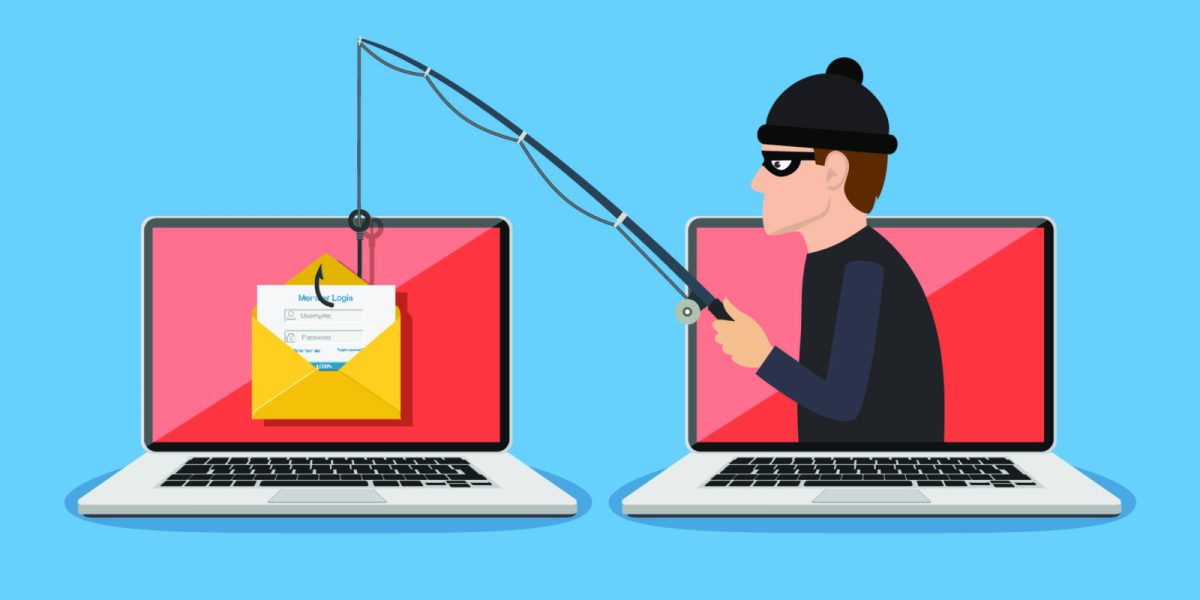
Phishing is a simple idea with a lot of different forms: someone pretends to be a person or organization you trust and tries to get you to do something you normally would not do.
That might mean clicking a link, signing in to a fake website, opening a file, approving a login, sharing an OTP, or sending money. The message could arrive by email, SMS, phone call, social media, or even through a QR code.
The difficult part is that a good phishing message does not always look fake. It may use the right logo, mention a real service you use, or even come from an account that has been compromised.
This guide breaks down how phishing works, the common types, realistic examples, the signs worth checking, and what to do if you accidentally interact with a phishing attempt.
What is phishing?
Phishing is a type of social engineering attack. The attacker creates a believable story, pretends to be someone you trust, and tries to influence your next action.
For example, the message might say that your bank noticed suspicious activity, your Microsoft 365 account needs attention, a parcel could not be delivered, or your manager needs something urgently.
The goal can be to steal passwords, payment information, personal data, access to an account, or money. In some attacks, the goal is to install malware or get access to a company account that can then be used against other people.
Email is a common delivery method, but phishing is not limited to email. It can happen through text messages, phone calls, social media, fake websites, messaging apps, and QR codes. The FTC and Microsoft both describe phishing as a deception-based attack that tries to get people to reveal information or take an unsafe action. FTC and Microsoft.
A simple example
Imagine receiving this message:
Your bank has detected unusual activity. Verify your account within 30 minutes to avoid suspension.
The link opens a page that looks like your bank’s login screen. You enter your username and password, but the page shows an error and sends you somewhere else.
From your point of view, the page simply failed. From the attacker’s point of view, the important part may already be finished: they have your login details.
How does a phishing attack work?
Most phishing attempts are built around the same basic idea: get your attention, make the request believable, create enough pressure that you act quickly, and then use the result.
1. The attacker chooses a believable story
The story needs to give you a reason to care. Common examples include a blocked account, an unusual login, an unpaid invoice, a delivery problem, a refund, a password reset, or an urgent request from someone at work.
2. The attacker impersonates someone you trust
The attacker may copy a company’s branding, use a lookalike domain, imitate a colleague, spoof a phone number, or compromise a real account. This is why spelling mistakes are not a reliable test. A phishing message can be well written and still be malicious.
3. The message creates pressure
Urgency is useful to a scammer because it makes verification less likely. Phrases such as “act now,” “your account will be closed,” or “I need this before the meeting” are meant to keep you focused on the request rather than on whether the request is genuine.
4. You are asked to do something
The action could be small: click a link, open a document, scan a QR code, approve an MFA prompt, call a number, or enter an OTP. It could also be much more serious, such as transferring money or changing a supplier’s bank details.
5. The attacker uses the result
A stolen password can lead to account takeover. A malicious attachment can install malware. A stolen payment detail can be used for fraud. A compromised business account can also be used to send more convincing messages to coworkers, customers, or suppliers.
What are attackers actually trying to get?
Not every phishing attack is trying to steal a password. The requested action often tells you what the attacker wants.
- Passwords: to access email, social media, cloud services, or other accounts.
- One-time codes: to complete a login or transaction while the attacker is trying to access an account.
- Payment information: such as card or banking details.
- Personal information: such as identity or contact details that can be used for fraud or further scams.
- Money: through fake invoices, payment requests, refunds, or impersonation.
- Device access: through malicious files, software, or instructions that install malware.
- Account access: because a compromised email or cloud account can become a starting point for further attacks.
Types of phishing attacks
Email phishing
A criminal sends an email that appears to come from a bank, online service, delivery company, employer, or another trusted organization.
Example: “Your Microsoft 365 password expires today. Sign in to keep your account active.” The link leads to a fake sign-in page designed to capture the credentials.
Spear phishing
Spear phishing is targeted at a particular person or organization. The attacker may use information about the target’s job, projects, coworkers, suppliers, or recent activity to make the message more believable.
Whaling
Whaling is a form of targeted phishing aimed at senior or high-value people, such as executives. One common scenario is a fake request from a CEO or finance leader asking an employee to make an urgent payment.
Smishing
Smishing is phishing delivered through SMS or other text messages. A typical example is a fake delivery notification asking you to pay a small fee or update your address through a link.
Vishing
Vishing is voice phishing. The attacker calls and may claim to be from a bank, technical support team, government agency, or another trusted organization. Caller ID should not be treated as proof of identity because phone numbers can be spoofed.
Clone phishing
In clone phishing, an attacker copies a legitimate message that the victim has seen before and replaces a link or attachment with a malicious one. Because the message looks familiar, the victim may be less suspicious.
QR-code phishing (quishing)
QR codes can hide the destination until after you scan them. A malicious QR code may send you to a fake payment or login page. The FTC warned in September 2026 about scammers placing fake QR codes over legitimate parking-payment codes to steal money or personal information.
If a QR code comes from an unexpected message or appears in a place where the code may have been replaced, don’t assume it is safe. When possible, open the organization’s official app or website yourself instead.
Simple phishing examples
Example 1: A fake bank alert
Ravi receives a text saying his bank has blocked a payment. The message includes a link to “unlock” the account.
He opens the link and sees a familiar-looking login page. After entering his details, the page reports an error. Ravi closes it and assumes the problem is over.
The problem is that the fake page may already have sent his credentials to the attacker. The safer option would have been to open the bank’s official app or type the bank’s known website address instead of using the link.
Example 2: A message from the “boss”
An employee receives a message that appears to come from the finance director: “I’m in a meeting. Please buy these gift cards and send me the codes.”
The sender name looks familiar, but the request is unusual. A quick call to the finance director using a known number would reveal whether the request is real.
Example 3: The delivery problem
You receive a message saying your parcel could not be delivered and a small fee is required to reschedule it. The amount is low, so the request feels harmless.
The link, however, leads to a fake payment page. The attacker’s real goal may be to collect your card details rather than the small delivery fee.
Example 4: A fake Microsoft 365 warning
An employee receives an email saying their Microsoft 365 account will be disabled in 30 minutes unless they sign in. The page looks like Microsoft and asks for the user’s password.
There may be no obvious spelling mistake or strange logo. The real warning sign is the combination of an unexpected request, a login link, and pressure to act immediately. The safer approach is to open Microsoft 365 directly rather than using the link in the message.
Example 5: A fake CAPTCHA
A page suddenly asks you to prove that you are human. It looks like a normal CAPTCHA, but the instructions tell you to press keys such as Windows + R, paste a command, and press Enter.
That is not a normal CAPTCHA. The FTC warned in June 2026 about phishing pages using fake CAPTCHA prompts to trick people into running commands that can install malware. A real CAPTCHA should not ask you to run commands on your computer.
Example 6: A vendor asks to change bank details
A company’s regular supplier sends an email saying its bank account has changed and asks the finance team to use the new details for the next payment.
The email might be genuine, or the supplier’s mailbox might have been compromised. The safe response is not to approve the change based only on the email. Verify the request through a trusted contact method already on file.
For a deeper explanation of this type of fraud, see our guide to Vendor Email Compromise (VEC).
How to spot a phishing message
There is no single sign that proves a message is phishing. A familiar logo does not prove that it is genuine, and a spelling mistake does not prove that it is fake. Look at the whole request.
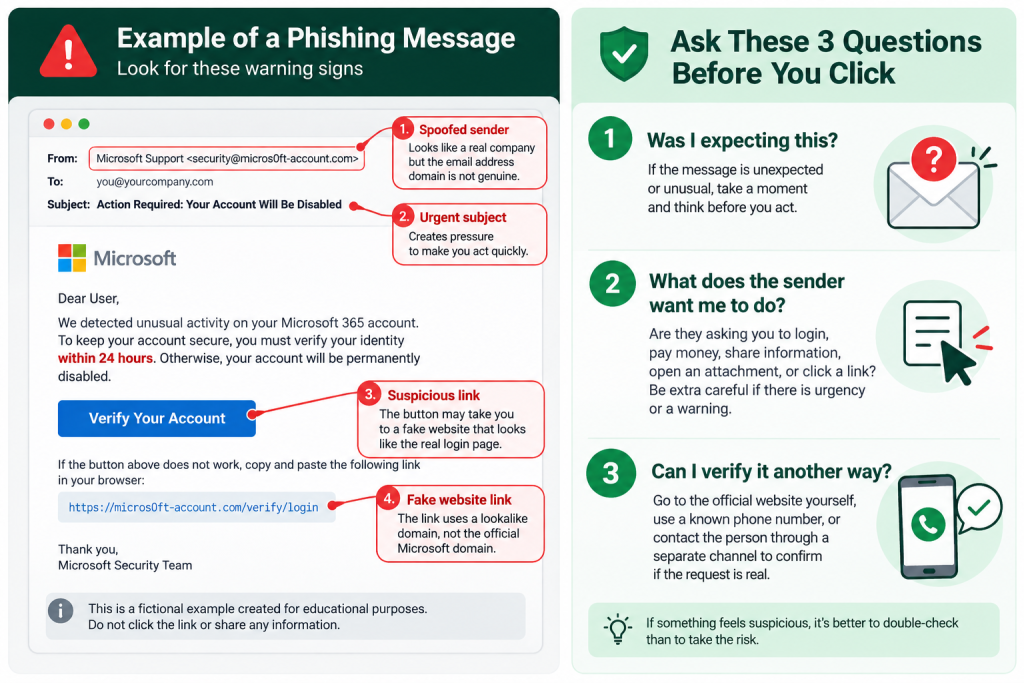
Ask three questions before you act
- Was I expecting this? An unexpected request deserves more scrutiny.
- What does the sender want me to do? Pay, sign in, download something, share information, approve a login, or change account details?
- Can I verify it somewhere else? Open the official website yourself or contact the person or organization using details you already know are genuine.
Check the sender, not just the display name
“Microsoft Support” or “Your Bank” can be used as a display name even when the actual email address belongs to another domain. Look at the real sender address and watch for small changes in the domain name.
Look at where a link goes
On a computer, hover over a link before clicking it. On a phone, be cautious with links in unexpected messages. If the destination is unfamiliar or does not match the organization that supposedly sent the message, don’t use it.
Also remember that HTTPS or a padlock does not prove that a website is legitimate. A fake website can use HTTPS too.
Be careful when a message creates pressure
“Act now,” “your account will be closed,” and “I need this before the meeting” are common pressure tactics. Urgency does not prove that a message is fake, but it is a good reason to slow down.
Treat unexpected attachments and downloads carefully
If you were not expecting a file, confirm it with the sender through another channel before opening it. Be especially careful if a page asks you to install software, run a command, or disable a security feature.
Don’t use grammar as your main test
Bad grammar can be a warning sign, but it is not a reliable way to identify phishing. Attackers can copy real messages, use stolen templates, or use AI tools to produce convincing text. A polished message can still be malicious.
Verify unusual requests independently
This is one of the most useful habits you can build. If a message asks you to transfer money, change bank details, share a password, approve a login, or provide sensitive information, don’t verify it by replying to the same message. Use a phone number, website, or other contact method you already trust.
Can MFA stop phishing?
Multi-factor authentication makes account takeover harder if a password is stolen, but ordinary MFA is not a guarantee against phishing.
Some attacks are designed to trick people into approving a login, entering a one-time code into a fake page, or giving an attacker access through another part of the account recovery process.
For stronger protection, CISA recommends phishing-resistant MFA. FIDO-based authentication, including passkeys and security keys, is designed to resist common phishing techniques because the authentication is tied to the legitimate website or service. If phishing-resistant MFA is not available, using MFA is still better than relying on a password alone.
What to do if you clicked a phishing link
Don’t panic, but don’t ignore it either. What you should do depends on what happened after the click.
- If you only opened the page: close it. Don’t enter information or download anything.
- If you entered a password: change it immediately from the real website. If you reused the password elsewhere, change it there too.
- If you entered banking or card information: contact your bank or card provider using an official number and follow its instructions.
- If you entered an OTP or approved an unexpected MFA request: contact the affected service or your organization’s IT/security team immediately and change the relevant credentials.
- If you downloaded or opened a suspicious file: disconnect the affected device from the network when appropriate and contact your IT/security team. Run a security scan and follow the team’s incident-response process.
- If you sent money: contact your bank or payment provider immediately. Fast reporting can give the provider more opportunity to investigate or attempt recovery, although recovery is not guaranteed.
The FTC also recommends contacting the real organization through a website or phone number you already know is genuine rather than using contact details provided in the suspicious message.
How businesses can reduce phishing risk
Security awareness is useful, but it should not be the only defense. A good security program assumes that someone will eventually click the wrong thing and limits what can happen next.
- Require MFA for important accounts, with phishing-resistant MFA where practical.
- Use email security controls to detect malicious links, attachments, spoofing, and suspicious messages.
- Keep operating systems, browsers, applications, and security software updated.
- Give employees an easy way to report suspicious messages.
- Require independent verification for unusual payment requests and vendor bank-account changes.
- Use least privilege so a compromised account does not automatically have access to everything.
- Monitor suspicious sign-ins, mailbox forwarding rules, inbox rules, and other signs of account compromise.
- Have a clear process for responding to compromised accounts and fraudulent payments.
These controls matter because phishing is often only the first step. A stolen account can be used to send convincing messages to coworkers, access company data, or help an attacker move further into an organization.
How to report a phishing scam in India
If you are in India and a phishing attempt results in financial fraud, report it as soon as possible through the Government of India’s National Cyber Crime Reporting Portal. The official portal also lists 1930 as the national helpline for reporting online financial fraud.
If money has already been transferred, contact your bank or payment provider immediately as well. Keep screenshots, phone numbers, email addresses, transaction details, URLs, and other relevant evidence for the report.
Key takeaways
Phishing is not really about spotting one obvious mistake in an email. The more useful habit is to question the request itself.
- Don’t trust a message just because it uses a familiar logo, name, or phone number.
- Check where links actually lead before opening them.
- Be more careful when a message creates fear or urgency.
- Never share passwords or sensitive information simply because a message asks for them.
- Verify unusual payment, account, or vendor requests through a trusted channel.
- Use MFA, and choose phishing-resistant MFA when it is available.
- Be cautious with QR codes, unexpected downloads, and fake CAPTCHA instructions.
- If you make a mistake, act quickly rather than hoping nothing happened.
A suspicious message does not have to look obviously fake. If something feels unusual, you don’t need to prove that it is a scam before taking a safer route. Close the message, open the real website yourself, or contact the person or company using details you already trust.