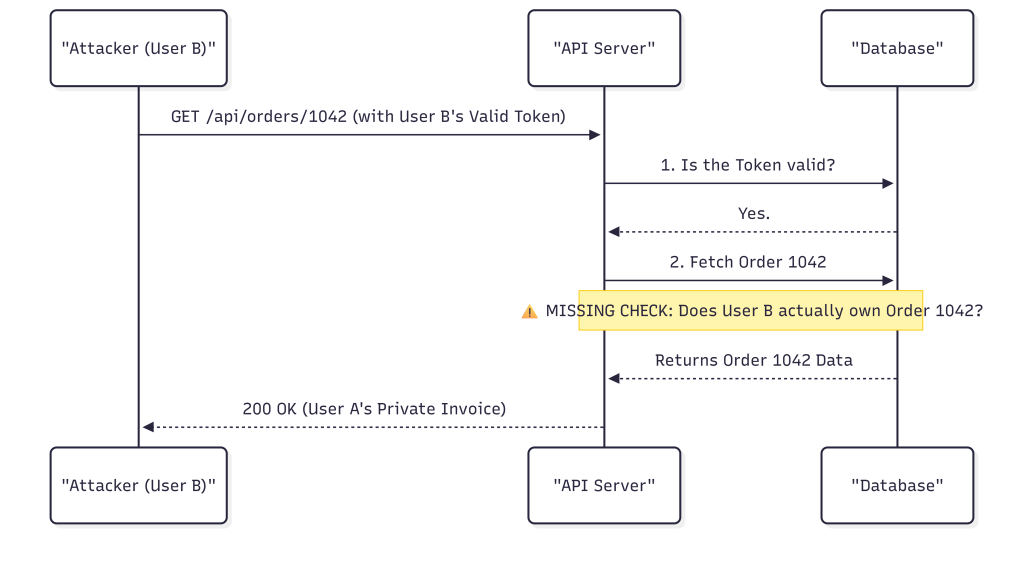
During a web application assessment last year, I found a BOLA vulnerability that let any authenticated user pull any other user’s invoice by simply changing a number in the URL. The endpoint was protected. You needed a valid session token to reach it. The developers had done authentication properly. But the authorization check was completely missing – the API never verified whether the token making the request actually belonged to the account that owned invoice 1042, or 1043, or 7891. Every invoice on the platform was readable by any logged-in user.
That finding took about four minutes to discover. Change the number, get a 200 response with someone else’s billing data. It’s one of the most common API vulnerabilities I run into, and it’s almost always invisible to functional testing because everything “works” – just not for the right person.
This guide covers how to actually test APIs for security issues, built around the OWASP API Security Top 10 and the OWASP Web Security Testing Guide. The examples are illustrative and should only be used against systems you are authorised to assess.
Quick API Security Checklist
- Map documented and undocumented API endpoints.
- Identify API versions, legacy hosts and non-production environments.
- Test authentication with missing, invalid and expired credentials.
- Test object-level authorization with two separate accounts.
- Test function-level authorization with different privilege levels.
- Check whether users can read or modify restricted object properties.
- Validate JWT signature, issuer, audience and algorithm handling where JWTs are used.
- Test rate limits and expensive operations, not just login endpoints.
- Test sensitive business workflows for replay, automation and sequencing problems.
- Check user-controlled URLs for SSRF.
- Compare API responses with what the client actually needs.
- Review CORS, TLS, error handling and security configuration.
- Look for deprecated, undocumented and shadow APIs.
- Test GraphQL separately when it is part of the application.
- Review how data from third-party APIs is validated before it is trusted.
API Test Cases
1. Start With API Reconnaissance
Before testing individual vulnerabilities, build an inventory of the API attack surface. The OWASP Web Security Testing Guide recommends finding documented and undocumented endpoints, parameters and API-related information exposed through HTML and JavaScript. It also recommends looking at API documentation, older versions and the different privilege levels available during an assessment.
Start with OpenAPI or Swagger documentation if it is available. Useful locations often include:
/swagger
/swagger.json
/openapi.json
/api-docs
/graphql
/api/v1
/api/v2
Do not assume that the documentation is complete. Compare it with traffic generated by the application, mobile clients and JavaScript bundles. Older API specifications can also reveal endpoints that are still deployed even though they are no longer documented.
During an authorised test, capture complete requests in an intercepting proxy such as Burp Suite or OWASP ZAP. Record the method, path, query parameters, headers, body, cookies and response. Hidden parameters are often as important as the documented ones. I’ve found sensitive functionality sitting in undocumented endpoints that weren’t in the Swagger spec and only showed up in JavaScript bundle traffic.
2. Test Authentication Separately From Authorization
Authentication answers one question: who is making the request? Authorization answers another: is that identity allowed to perform this action on this resource? Testing only the login mechanism misses many API authorization problems.
For protected endpoints, test requests with no credential, an invalid credential and an expired credential. Also check whether authentication is consistently enforced across equivalent endpoints and HTTP methods.
GET /api/account/profile HTTP/1.1
Host: api.example.com
Authorization: Bearer <valid-token>
Then repeat the request without the Authorization header and with an invalid or expired token. A protected endpoint should not quietly fall back to an unauthenticated execution path. You’d be surprised how often it does – particularly on older endpoints that predate the authentication middleware being introduced.
3. Test Broken Object Level Authorization (BOLA)
BOLA is one of the most important API tests because APIs frequently expose identifiers for users, orders, invoices, files, tickets and other objects. OWASP API1 recommends using separate accounts and changing object identifiers to determine whether one user can access or modify another user’s resources. This is exactly what I described in the intro – and it’s the vulnerability I find most consistently across API assessments.
Account A legitimately owns order 1042:
GET /api/orders/1042 HTTP/1.1
Host: api.example.com
Authorization: Bearer <account-A-token>
Now use Account B and change the identifier:
GET /api/orders/1042 HTTP/1.1
Host: api.example.com
Authorization: Bearer <account-B-token>
The important point is not whether the identifier is sequential. UUIDs can also be affected by authorization flaws. The server must check whether the authenticated caller is permitted to access that specific object.
Repeat the test for GET, PUT, PATCH and DELETE where those operations exist. A GET request might be protected while an update or delete endpoint accidentally performs a weaker authorization check.
Do not treat unpredictable IDs as a replacement for authorization. An opaque identifier can make enumeration harder, but it does not establish permission.
4. Test Function-Level Authorization
Function-level authorization checks whether a user can execute an operation at all. This is different from BOLA, where the problem is access to a particular object.
For example, a normal user might legitimately access:
GET /api/profilebut should not be able to perform an administrative operation such as:
POST /api/admin/users/123/disable
Authorization: Bearer <regular-user-token>
During testing, compare the same endpoint and operation using accounts with different roles. Also test alternate HTTP methods where relevant. OWASP’s testing guidance specifically recommends testing administrative and other high-privilege functions with lower-privilege accounts.
5. Test Object Property Authorization: Mass Assignment and Data Exposure
An API can correctly authorise access to an object while still allowing the caller to change a property they should not control.
Suppose the normal profile request is:
PATCH /api/profile/1001
Content-Type: application/json

{
  "displayName": "Mayank"
}
During an authorised assessment, test whether the server accepts additional fields that are supposed to be server-controlled:
PATCH /api/profile/1001
Content-Type: application/json

{
  "displayName": "Mayank",
  "role": "admin",
  "accountStatus": "active"
}
If the application silently accepts and applies a privileged property, the issue is not fixed by hiding the field from the frontend. The server needs an explicit allowlist of properties that the caller is permitted to modify. I’ve seen this exact issue on three separate engagements where the developers assumed that because the UI never sent role, nobody would. Burp Suite users will.
The same applies to what the API sends back. Do not judge a response by what the browser displays – inspect the raw response directly. A profile page may show only a name and email while the API returns internal fields the client never needed:
{
  "id": "1001",
  "name": "Alice",
  "email": "alice@example.com",
  "role": "user",
  "internalAccountId": "ACC-78421",
  "lastLoginIp": "10.0.2.15"
}
The frontend hiding a field is not a security control. An attacker can inspect the raw HTTP response directly. Ask whether each returned field is actually necessary for that client and user context, and if not, strip it server-side.
6. Test JWT and Token Validation
When an API uses JWTs, do not stop at checking whether the token is signed. RFC 8725 recommends that applications restrict accepted algorithms, validate cryptographic operations, and validate claims such as issuer and audience when those claims are relevant to the deployment.
Useful checks include:
- Is the signature actually verified?
- Is the accepted algorithm explicitly restricted?
- Is the issuer validated where applicable?
- Is the audience validated where applicable?
- Are expired tokens rejected?
- Are tokens intended for one application rejected by another application?
- Are different JWT types separated by appropriate validation rules?
Do not recommend blindly changing alg to none as a universal test. The correct assessment is to determine whether the application accepts an algorithm outside its intended policy and whether the cryptographic verification rules are correctly enforced.
7. Test Input Validation and Injection
APIs accept input through URL paths, query parameters, headers and request bodies. Test each input according to how the server uses it. A string passed to a database is a different security concern from a URL passed to a server-side HTTP client.
For a search parameter, for example, test how the application handles unexpected characters and types:
GET /api/products?search='"><For JSON APIs, test type boundaries and unexpected properties:
{
  "quantity": "not-a-number",
  "price": -1,
  "unexpectedField": true
}
The goal is not simply to make the API return an error. Determine whether malformed input reaches a sensitive backend operation, causes an unexpected state change, or produces a verbose error containing implementation details.
8. Test Rate Limits and Resource Consumption
Rate limiting is broader than protecting a login endpoint. OWASP API4 includes network bandwidth, CPU, memory, storage and paid resources such as email or SMS as potential resources that an API can consume.
Look for expensive or abuse-sensitive operations such as:
- Login and authentication attempts
- OTP or password-reset requests
- SMS and email triggering
- Large searches or exports
- File generation
- Bulk operations
- Payment or transaction operations
Do not assume that a single rate limit protects the whole API. Compare limits across endpoints and, where appropriate, across authenticated identities and client types. Test within an agreed engagement rate so that the assessment itself does not create an availability problem.
9. Test Sensitive Business Flows
Some API problems are not traditional coding vulnerabilities. The application may correctly execute every request while still allowing a business process to be abused through automation or replay.
Consider a coupon endpoint:
POST /api/cart/apply-coupon
Content-Type: application/json

{
  "coupon": "WELCOME20"
}
A tester should determine whether the same promotion can be applied repeatedly, whether the operation can be replayed after the order state changes, and whether the server enforces the intended business rules.
Similar testing applies to password recovery, ticket purchases, withdrawals, account verification, referral rewards and other flows where repeated or out-of-order actions could create a business impact.
10. Test Server-Side Request Forgery (SSRF)
SSRF becomes relevant when an API accepts a URL or otherwise allows the server to retrieve a remote resource. OWASP describes this as a situation where an attacker can influence the server into making a request to an unexpected destination.
A common pattern is an image-import or URL-preview endpoint:
POST /api/import-image
Content-Type: application/json

{
  "url": "https://example.com/image.jpg"
}
During an authorised test, determine whether the application validates the destination and whether it can be induced to connect to internal or otherwise unintended resources. On cloud-hosted applications, the first place to check is whether the metadata endpoint is reachable – http://169.254.169.254/ on AWS and GCP, http://169.254.169.254/metadata/ on Azure. Reaching those from a user-supplied URL in production is a critical finding. Testing should only go this far when the engagement explicitly authorises it.
11. Review API Inventory and Deprecated Versions
An API is not secure simply because the newest version is secure. Old versions may remain reachable after a migration.
/api/v1/users/1001
/api/v2/users/1001
/api/v3/users/1001
Compare authentication, authorization, validation and response behaviour between versions. Also look for development, staging, debug or partner-facing API hosts that are unintentionally exposed. I’ve found v1 endpoints with no authentication at all sitting behind applications whose v3 endpoints were properly secured. The developers had forgotten v1 was still running.
OWASP identifies accurate inventories of API hosts and deployed versions as an important control because deprecated versions and exposed debug endpoints can create significant additional attack surface.
12. Test GraphQL APIs Differently
GraphQL does not remove the authorization problems found in REST APIs. It changes how they appear. Instead of changing a REST path parameter, a tester may manipulate an object identifier inside a query or mutation.
query {
  user(id: "1001") {
    name
    email
    orders {
      id
      amount
    }
  }
}
Test the same query using a second account and determine whether the resolver enforces object-level authorization. Also review the schema for fields that should not be available to a particular role and test expensive queries for appropriate resource controls.
13. Test CORS Carefully
CORS is a browser security mechanism – it is not an authentication or authorization control. A permissive CORS policy can become security-sensitive when an API uses browser credentials such as cookies and exposes sensitive responses to other origins. If you want to understand how CORS misconfigurations interact with session-based attacks, the CSRF article on this site covers exactly that relationship.
Access-Control-Allow-Origin: https://trusted.example
Access-Control-Allow-Credentials: true
Test whether an untrusted origin is accepted and whether credentials are permitted when they should not be. Do not automatically label Access-Control-Allow-Origin: * as a vulnerability: public APIs may intentionally allow requests from any origin. The security impact depends on the API, browser credentials and data being exposed.
14. Check TLS and Transport Security
Authenticated API traffic and sensitive data should be protected with correctly configured TLS. OWASP’s TLS guidance specifically recommends that API-only endpoints disable unencrypted HTTP where possible and avoid relying on redirects as the security mechanism.
During testing, verify that credentials, session tokens and sensitive data are not sent over cleartext HTTP and that the service presents a valid certificate for its intended hostname. For a deeper look at how binary-level protections complement transport security on the application side, the binary protections guide on this site is worth reading alongside this checklist.
15. Inspect Error Responses
Error handling is part of API security. Send malformed JSON, invalid types, missing parameters and invalid object identifiers, then inspect the complete response.
HTTP/1.1 500 Internal Server Error
Content-Type: application/json

{
  "error": "SQLSTATE[42S02]: Base table or view not found: users"
}
A production API should avoid exposing stack traces, database details, internal file paths, credentials or other implementation information to the client. Detailed diagnostics belong in protected server-side logs.
16. Test Security Logging and Sensitive Data in Logs
During an API assessment, check whether security-relevant events are recorded and whether sensitive values are being written to logs. This is especially important for authentication failures, authorization failures and other events that may indicate abuse.
For example, send a failed authentication request and, where log access is available as part of the engagement, check what the application records:
POST /api/login HTTP/1.1
Host: api.example.com
Content-Type: application/json

{
  "username": "alice@example.com",
  "password": "TestPassword123"
}
The log may need enough information to identify the event, such as the account, endpoint, timestamp and source address. It should not unnecessarily contain the password, bearer token, API key, session cookie or complete Authorization header.
Repeat the check with other security-relevant requests, such as an invalid token or an authorization failure.
What to check:
- Are important authentication and authorization events recorded?
- Are passwords, tokens, API keys and session credentials excluded or appropriately redacted?
- Are sensitive request or response bodies being logged unnecessarily?
- Is there enough event information to investigate suspicious API activity?
If reusable credentials are found in logs, document where they appear, who can access the logs and whether the exposed value can still be used.
17. Test How the API Handles Third-Party Responses
Many APIs depend on external services such as payment providers, shipping services, identity providers or other APIs. During an assessment, identify where the application consumes data from these services and determine whether that data influences security-sensitive decisions.
For example, an application might receive this response from a payment service:
{
  "transaction_id": "TX-1001",
  "status": "approved",
  "amount": 5000
}
Where the engagement allows controlled manipulation of the integration or its test environment, examine how the application handles unexpected responses. Useful cases include missing fields, unexpected data types, malformed JSON, server errors and timeouts.
{
  "transaction_id": "TX-1001",
  "status": "unexpected",
  "amount": -5000
}
What to check:
- Are important response fields validated before they are used?
- Can an unexpected third-party response change a security-sensitive decision?
- Are third-party credentials protected?
- Are errors and timeouts handled safely?
- Does the application expose sensitive third-party response data to the client?
- Does the application safely handle redirects or externally supplied URLs where those are part of the integration?
An unexpected value by itself is not necessarily a vulnerability. The finding depends on whether the response can be influenced and whether that influence produces a security impact.
18. API Documentation Is Part of the Attack Surface
Swagger or OpenAPI documentation can be extremely useful to developers and testers, but an exposed production specification can reveal endpoints, parameters, schemas and internal functionality that was not intended for public users.
Check whether documentation is intentionally public. If it is restricted, verify that the restriction is actually enforced. Do not assume that hiding a Swagger URL provides meaningful protection for the API itself – the endpoints still need their own authentication and authorization controls.
19. A Practical API Testing Workflow
A useful assessment is easier to reproduce when the tests follow a consistent order:
| Phase | What to do |
|---|---|
| Recon | Map hosts, versions, endpoints, parameters and documentation. |
| Authentication | Test missing, invalid, expired and incorrectly scoped credentials. |
| Authorization | Use multiple accounts and roles to test object, function and property access. |
| Input | Test types, boundaries, unexpected properties and injection points. |
| Business logic | Test replay, sequencing, automation and sensitive workflows. |
| Infrastructure | Review TLS, CORS, headers, error handling and configuration. |
| Inventory | Check deprecated versions, debug endpoints and forgotten hosts. |
| Third parties | Review validation, redirects, timeouts and trust boundaries. |
API Security Testing Checklist
RECONNAISSANCE
[ ] API documentation and OpenAPI/Swagger specifications reviewed
[ ] Documented and undocumented endpoints reviewed
[ ] API versions and deprecated versions reviewed
[ ] API hosts and non-production environments reviewed
[ ] GraphQL and other API technologies identified where applicable
[ ] Parameters and relevant undocumented inputs reviewed

AUTHENTICATION
[ ] Missing credentials tested
[ ] Invalid token tested
[ ] Expired credentials tested where applicable
[ ] JWT validation reviewed
[ ] Issuer and audience validation reviewed where applicable

AUTHORIZATION
[ ] BOLA tested with two accounts
[ ] BFLA tested with different roles
[ ] Property-level authorization tested
[ ] Cross-user access tested
[ ] Higher-privilege functions tested with lower-privileged accounts
[ ] Cross-tenant access tested

INPUT & BUSINESS LOGIC
[ ] Type and boundary validation tested
[ ] Injection points tested
[ ] Mass assignment tested
[ ] Rate limits tested
[ ] Sensitive workflows tested for replay and abuse
[ ] SSRF reviewed where URL fetching exists

RESPONSE & CONFIGURATION
[ ] Excessive data exposure tested
[ ] Error messages reviewed
[ ] CORS reviewed
[ ] TLS reviewed
[ ] Deployment configuration reviewed where relevant
[ ] Debug endpoints reviewed
[ ] Deprecated APIs tested
[ ] Third-party API trust boundaries reviewed

GRAPHQL
[ ] Resolver authorization tested
[ ] Sensitive fields reviewed
[ ] Introspection exposure reviewed according to deployment requirements
[ ] Query depth / complexity controls reviewed where appropriate
OWASP API Security Top 10:2023 Mapping
| OWASP risk | Where to test |
|---|---|
| API1: Broken Object Level Authorization | Object IDs, UUIDs, nested resources, GraphQL objects |
| API2: Broken Authentication | Tokens, sessions and authentication flows |
| API3: Broken Object Property Level Authorization | Response fields and writable properties |
| API4: Unrestricted Resource Consumption | Rate limits, expensive requests and paid resources |
| API5: Broken Function Level Authorization | Administrative and role-specific operations |
| API6: Unrestricted Access to Sensitive Business Flows | Purchases, rewards, recovery and other high-value workflows |
| API7: Server-Side Request Forgery | URL fetching and server-side network requests |
| API8: Security Misconfiguration | Debugging, errors, TLS, CORS and deployment configuration |
| API9: Improper Inventory Management | Hosts, versions, deprecated and undocumented APIs |
| API10: Unsafe Consumption of APIs | Third-party API responses, redirects and integrations |
Common API Security Mistakes
- Assuming authentication means authorization is correct.
- Relying on UUIDs or hidden IDs instead of enforcing object-level authorization.
- Filtering sensitive fields only in frontend JavaScript.
- Trusting fields supplied by the client because the UI does not normally send them.
- Applying one global rate limit to every API operation.
- Assuming a newer API version makes older versions irrelevant.
- Treating CORS as an API authentication mechanism.
- Logging tokens, passwords or complete sensitive request bodies.
- Trusting data from third-party APIs without validating it.
- Using a WAF as a replacement for application-level authorization.
Where to Focus First
If I had to pick the three tests that consistently return the most critical findings across API assessments, it would be BOLA with two accounts, mass assignment with fields the UI never sends, and deprecated API versions that nobody remembered to decommission. Those three alone cover a significant portion of what ends up in real bug bounty reports and penetration test findings.
The most valuable API tests are often the simplest: use a second account, change an object identifier, add a property the frontend never sends, replay a sensitive request, inspect the raw response. These reveal security decisions that functional testing never exercises – because functional testing is designed to confirm things work, not to find out what happens when you use them the wrong way.
Use this checklist as a starting point, then adapt it to the API’s actual threat model. A payment API, a healthcare API, an internal microservice and a public developer API do not share the same risk profile. Let the data and the business logic guide where you spend your time.