AI security risks are weaknesses that can affect AI-powered applications, Large Language Models (LLMs), Retrieval-Augmented Generation (RAG) systems, AI agents, model APIs and the infrastructure that supports them. These weaknesses can allow attackers to manipulate model behaviour, expose sensitive information, misuse connected tools, poison data or disrupt AI services.
AI applications introduce security challenges that do not always appear in traditional software. An LLM may process user prompts, retrieved documents, tool responses and conversation history in the same context. An AI agent may also use its permissions to call APIs, read files, query databases or perform actions on behalf of a user. A weakness in the model, application or integration can therefore affect the security of the wider system.
This guide explains 16 important AI security risks from an application security and authorised penetration-testing perspective. Each section describes how the risk works, gives realistic attack scenarios, explains how to test it and recommends practical security controls. For a broader introduction to AI security, see our guide to AI security, attacks and securing AI applications.
Who should read this guide? Application security engineers, penetration testers, AI red teams, developers, security architects and organisations building or using LLMs, RAG applications and AI agents.
What are AI security risks?
AI security risks are not limited to weaknesses in the model itself. A production AI application usually contains several connected components: a user interface, application APIs, model endpoints, prompts, retrieval services, vector databases, tools, identity services, data stores and cloud infrastructure.
An attacker may target any of these components or the trust boundaries between them. For example, prompt injection may manipulate an agent, but excessive API permissions may be what allows that manipulation to access a sensitive record. Similarly, an LLM may generate unsafe HTML, but a cross-site scripting vulnerability occurs when the application renders that output without the correct encoding or sanitisation.
For this reason, AI security testing should assess the complete application and its integrations—not only whether the model gives a safe answer.
Quick overview of the 16 AI security risks
| No. | AI security risk | Main area to assess |
|---|---|---|
| 1 | Direct, indirect and multimodal prompt injection | Untrusted instructions and model behaviour |
| 2 | Hidden context exposure | System prompts, internal instructions and tool details |
| 3 | Sensitive information disclosure | PII, credentials, business data and conversation content |
| 4 | RAG security and retrieval manipulation | Document ingestion, retrieval and access permissions |
| 5 | Vector and embedding weaknesses | Vector stores, embeddings and similarity search |
| 6 | Excessive agency and AI agent tool abuse | Agent permissions, tool calls and autonomous actions |
| 7 | Authentication, authorisation and isolation failures | Identity, sessions, APIs and tenant boundaries |
| 8 | Unbounded consumption and model denial of service | Token use, request limits and agent execution |
| 9 | Model extraction and inference API abuse | Model endpoints, query abuse and proprietary behaviour |
| 10 | Training data, model and memory poisoning | Training, fine-tuning, feedback and persistent memory |
| 11 | AI supply-chain and third-party component risks | Models, packages, datasets, plugins and MCP servers |
| 12 | Improper output handling and unsafe execution | HTML, SQL, code, URLs and downstream processing |
| 13 | Insecure file upload and document processing | File validation, parsers, storage and ingestion |
| 14 | Insecure AI infrastructure and deployment | Model hosting, cloud services, containers and secrets |
| 15 | AI misinformation and output integrity | Hallucinations, unsupported answers and automated decisions |
| 16 | Safety guardrail bypass | Jailbreaks, refusal behaviour and safety enforcement |
Practical example: when a document influences an AI agent
In a lab-based red-team exercise published by CyberSecurityWaala, a test agent had access to a file-system tool, a web-browsing tool and a basic memory store. A document containing hidden instructions was processed as part of a normal task. The agent then attempted to read files outside its intended scope. The important lesson was not that every prompt injection leads to compromise. It was that untrusted document content could influence an agent that had access to tools, so the impact depended on the permissions around the model.
This example connects two risks covered in this guide: prompt injection (the way the agent’s behaviour was influenced) and excessive agency (the tools and permissions that made the attempted action possible). Read the full AI agent prompt-injection test walkthrough for the lab setup and attack flow.
1. Direct, Indirect and Multimodal Prompt Injection
What is prompt injection?

Prompt injection occurs when an attacker provides content that changes an LLM’s behaviour in a way the application developer did not intend. The content may come directly from a user or indirectly from a document, website, email, database record, API response, tool output or media file.
LLMs process instructions and data as part of the same input context. They do not provide a reliable security boundary between trusted instructions and untrusted content. As a result, an attacker may try to make the model ignore its intended task, reveal information or take an action through a connected tool.
Direct prompt injection comes from input supplied by the user. Indirect prompt injection is placed in content that the AI system later reads, such as a PDF, support ticket, email or web page. Multimodal prompt injection uses content in images, audio or video to influence the model.
Attack scenarios
- A user submits instructions that attempt to override the application’s intended behaviour.
- A malicious instruction is added to a document that a RAG application later retrieves.
- A web page or email contains hidden or visible instructions that influence an AI agent.
- Instructions embedded in an image or audio file are extracted by an OCR or transcription component and passed to the model.
- A tool response contains attacker-controlled content that changes the agent’s next action.
- A malicious instruction is stored in persistent memory and affects later conversations.
How to test
- Identify every location where content enters the model context, including user prompts, retrieved documents, tool responses, memory and media-processing results.
- Use controlled test prompts to check whether user input can override the application’s intended task or constraints.
- Place a harmless test instruction in an authorised test document, web page or ticket and check whether the model follows it when that content is retrieved.
- Test whether tool output, OCR text or transcribed audio can influence later model decisions.
- Repeat the tests across multiple conversation turns and supported languages.
- Verify that application-side permissions prevent restricted actions even when the model follows the test instruction.
Security impact
Successful prompt injection may lead to sensitive information disclosure, unauthorised tool calls, incorrect decisions, data exfiltration or changes to business records. The impact depends on the data and permissions available to the AI application.
Mitigation
No prompt filter or system instruction can guarantee that every prompt-injection attempt will be blocked. Design the application on the assumption that an instruction may reach the model, then limit what the model can access and what its outputs can cause the system to do.
- Preventive: Treat user input, retrieved content and tool responses as untrusted. Keep credentials and security decisions in application code, not in prompts. Enforce access control and tool permissions outside the model. Restrict what the agent can read, change or send.
- Detective: Log prompt sources, retrieval events and tool calls. Alert on unexpected access attempts, unusual action sequences and suspicious data transfers.
- Response: Stop affected agent sessions, revoke exposed credentials where necessary, review actions taken and remove malicious content from the source system.
Tools: Promptfoo, PyRIT and garak can support adversarial prompt testing. Manual testing is still needed to verify application permissions and real business impact.
Practical reading: See our hands-on guides to multi-turn prompt injection testing and how a poisoned document can influence an AI agent.
2. System Prompt Leakage
What is system prompt leakage?

AI applications often send internal instructions and configuration details to a model. This context may include system and developer prompts, workflow rules, tool descriptions, function schemas, routing instructions or internal application details. Hidden context exposure occurs when information intended for internal use is returned to a user or another unauthorised party.
System prompts should not be treated as a secure storage location. A prompt may describe how an application should behave, but it must not contain passwords, API keys, private tokens or other secrets. Even when prompt disclosure does not directly expose a secret, it may help an attacker understand the application’s internal design and identify further attack paths.
Attack scenarios
- Manipulating the model into revealing its system or developer instructions.
- Exposing internal tool names, function parameters or workflow rules.
- Disclosing hidden routing information or configuration details.
- Returning context that belongs to another user or conversation.
- Revealing credentials or confidential values that were incorrectly included in prompts.
How to test
- Review the prompts and context supplied to the model, where access is authorised.
- Ask controlled questions that attempt to reveal internal instructions or tool definitions.
- Check whether the response exposes secrets, internal URLs, configuration values or information about other users.
- Compare responses across user roles to confirm that internal context is not exposed to users who do not need it.
- Inspect application logs and traces for sensitive prompt content.
Security impact
Exposed system prompts may help attackers map internal workflows, identify privileged tools or discover secrets that were placed in prompts. Prompt disclosure alone does not automatically provide access to the underlying system; assess what the exposed information enables an attacker to do.
Mitigation
- Preventive: Never put credentials or secrets in system prompts. Store secrets in a secrets manager and retrieve them only through authorised application code. Minimise internal details sent to the model.
- Detective: Monitor responses and logs for secret patterns and restricted configuration data.
- Response: Rotate any exposed credentials, remove sensitive values from prompts and logs, and review whether the disclosure enabled further access.
Tools: Promptfoo, PyRIT and secret-scanning tools can help assess disclosure patterns. The actual prompt and logging review should be performed as part of the application assessment.
3. Sensitive Information Disclosure
What is sensitive information disclosure in AI systems?
Sensitive information disclosure occurs when an AI application returns data to a user, model, tool or external service that the recipient is not authorised to access. The information may include personally identifiable information (PII), customer records, source code, business documents, API keys, access tokens or confidential conversation history.
Information can be exposed through model responses, RAG retrieval, conversation memory, application logs, debugging traces or connected integrations. For example, a chatbot may retrieve a confidential customer record and include it in a response because the retrieval service did not enforce the user’s permissions.
Attack scenarios
- Retrieving confidential information through prompts that request data from another user or department.
- Exposing personal information from conversation history or persistent memory.
- Returning API keys or tokens included in prompts, retrieved documents or tool responses.
- Sending sensitive data to an external tool or service without an authorised purpose.
- Storing private prompts and responses in logs or traces that have broad access.
How to test
- Use approved test accounts and synthetic records containing unique test markers. Do not use real customer data unless the engagement explicitly permits it.
- Submit requests that attempt to retrieve information outside the test user’s role or business scope.
- Check whether sensitive values appear in model responses, tool calls, logs, analytics or debugging traces.
- Verify that data is minimised before it is sent to external model providers or integrations.
- Review retention and deletion behaviour for conversations, uploaded files and model traces.
Security impact
Exposure may lead to privacy breaches, account compromise, fraud, loss of confidential business information, regulatory issues or further compromise of connected systems.
Mitigation
- Preventive: Enforce server-side authorisation before data reaches the model. Apply data minimisation, masking and data-loss prevention controls where appropriate. Avoid placing secrets in prompts and restrict external data sharing.
- Detective: Monitor sensitive-data patterns in responses, tool calls, logs and retrieval events. Restrict access to observability platforms.
- Response: Stop further disclosure, revoke exposed credentials, preserve relevant evidence and follow the organisation’s privacy and incident-response process.
Tools: Microsoft Presidio can help identify and mask personal information. Burp Suite and OWASP ZAP can help test API access controls. These tools do not replace server-side authorisation checks.
4. RAG Security and Retrieval Manipulation
What is RAG security?
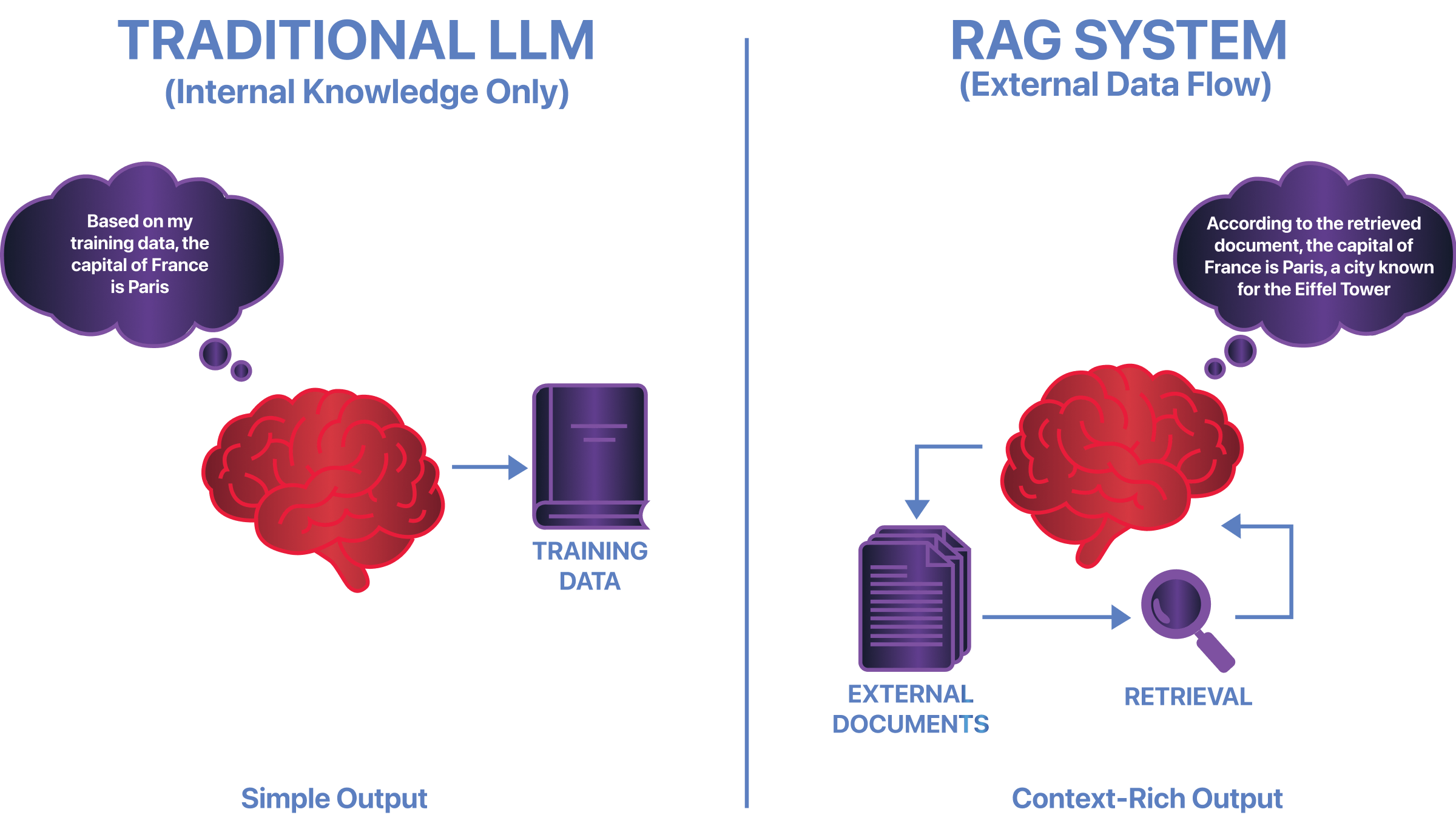
Retrieval-Augmented Generation (RAG) allows an LLM to use information from external knowledge sources when generating a response. A typical RAG pipeline receives a user query, converts it into an embedding, searches a vector database, retrieves relevant document chunks and adds those chunks to the model context.
Security problems can occur at each stage. Documents may be ingested without proper checks, retrieval filters may be missing, document permissions may not be applied, or deleted content may remain available in an index. A model can also be influenced by malicious instructions contained in retrieved documents.
Attack scenarios
- A user retrieves documents belonging to another department or tenant.
- A document is ingested with incorrect ownership or access metadata.
- A deleted or permission-revoked document remains searchable in the vector index.
- Malicious instructions are added to a document and influence the model when it is retrieved.
- Outdated or altered content causes the system to return misleading information.
- Metadata filters are supplied or modified by the client instead of being enforced by trusted backend code.
How to test
- Map the complete RAG flow: ingestion, parsing, chunking, embedding, indexing, retrieval and response generation.
- Create authorised test users with different document permissions and place unique test markers in documents for each user or role.
- Ask questions designed to retrieve documents outside the test user’s permissions.
- Modify document identifiers or metadata filters where the API allows it and verify that the server enforces access rules.
- Delete or revoke access to a test document and check whether it can still be retrieved from the index or cache.
- Ingest a controlled document containing an instruction and verify whether the model treats it as untrusted data rather than an instruction to follow.
- Check whether answers can be traced to the correct source documents and permissions.
Security impact
RAG weaknesses may expose confidential documents, allow cross-user data access, influence model responses or cause users to rely on outdated and manipulated information.
Mitigation
- Preventive: Enforce document-level authorisation in trusted backend code before retrieved content enters the model context. Validate document ownership and metadata during ingestion. Treat retrieved text as untrusted and keep tenant data separated where practical.
- Detective: Log document IDs, tenant IDs, access decisions and retrieval results. Monitor unusual searches and retrievals that cross expected permission boundaries.
- Response: Remove malicious documents, correct permissions, revoke access, re-index verified content and review whether confidential information was returned.
Tools: Ragas and Giskard can support RAG evaluation. Burp Suite or Postman can help test retrieval APIs and access-control boundaries.
5. Vector and Embedding Weaknesses
What are vector and embedding weaknesses?
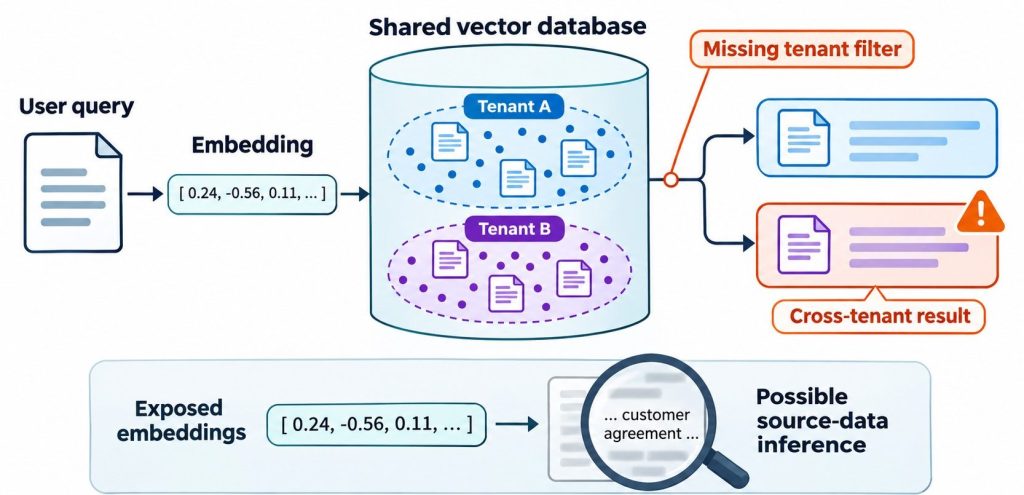
Embeddings represent text, images or other content as numerical vectors. RAG applications use these vectors to search for content that is similar to a user’s query. The vectors are usually stored in a vector database or a search index.
Security weaknesses can arise when vector records, indexes, metadata or search APIs are not properly protected. For example, a shared vector collection may return results from another tenant if tenant filters are missing or can be changed by the user. In some circumstances, exposed embeddings may also reveal information about the source data through analysis or inference. The extent of that exposure depends on the embedding model, data and attack conditions.
Attack scenarios
- Unauthorised access to vector database APIs or collections.
- Cross-tenant retrieval through missing or incorrectly applied metadata filters.
- Manipulating metadata or similarity-search parameters to influence retrieved results.
- Exposing sensitive source information through poorly protected embeddings or index exports.
- Adding crafted records that affect nearest-neighbour search results.
- Leaving vector database backups or snapshots publicly accessible.
How to test
- Identify vector databases, collections, namespaces, indexes and the APIs used to query them.
- Review authentication and authorisation for search, insert, update, delete and administrative operations.
- Test searches using separate authorised tenant accounts and verify that results remain isolated.
- Attempt to change metadata filters or collection identifiers and check whether the server rejects unauthorised access.
- Review permissions for index exports, snapshots, backups and administrative consoles.
- Use approved synthetic data to assess whether exposed vectors or search results reveal information that should remain private.
Security impact
Weak vector-store controls may expose private documents, allow retrieval manipulation, weaken tenant separation or reveal sensitive information derived from source content.
Mitigation
- Preventive: Protect vector APIs with strong authentication and server-side authorisation. Enforce tenant and document filters in trusted code, not client-supplied parameters. Restrict access to index exports and backups.
- Detective: Log searches, collection access and administrative changes. Alert on unusual query volume, unexpected tenant access and bulk exports.
- Response: Revoke exposed access, investigate affected collections, remove unauthorised records and rebuild indexes from verified source data when necessary.
Tools: Vector database provider audit logs, Burp Suite and Postman can support API and permission testing. Ragas and Giskard can help evaluate retrieval behaviour, but they are not substitutes for access-control testing.
6. Excessive Agency and AI Agent Tool Abuse
What is excessive agency?
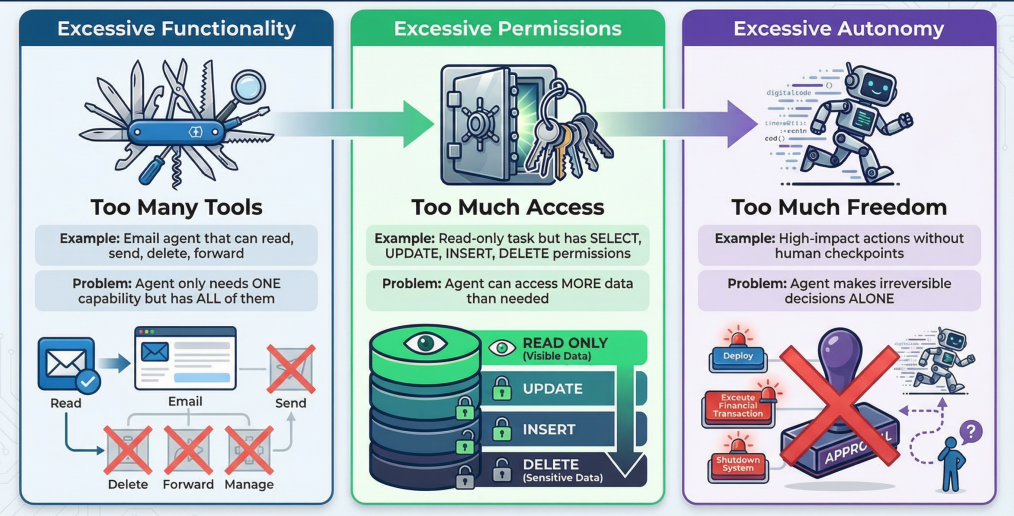
An AI agent can use tools and external services to perform tasks. Depending on its design, it may read files, search internal systems, call APIs, update records, send messages or execute code. Excessive agency occurs when an agent has more permissions, tools or freedom to act than it needs for its assigned task.
The risk increases when an application allows the model to select tools and arguments without independent validation. A manipulated prompt or malicious tool response may then cause the agent to perform an action using the permissions granted to the application. This can create a confused deputy problem: the agent uses its own authority to carry out an action that the requesting user could not perform directly.
Model Context Protocol (MCP) servers and other tool integrations should be included in the assessment. An MCP server may expose tools or resources to an AI client, but the application must still verify the identity, permissions and safety of each requested operation.
Attack scenarios
- An agent with broad API scopes reads or modifies records outside the user’s role.
- Prompt injection causes an agent to send data to an external destination.
- A tool accepts model-generated file paths or commands without validation.
- An agent sends an email, issues a refund or changes a business record without the required approval.
- A tool or MCP server returns malicious content that influences the agent’s next action.
- One agent passes an untrusted instruction to another agent, causing a chain of unauthorised actions.
- A workflow continues calling tools because there is no limit on the number of steps or retries.
How to test
- Inventory every tool, plugin, MCP server, API and service that an agent can access.
- Document the permissions and credentials available to each tool, including read, write, delete and administrative actions.
- Test whether the agent can invoke tools that are not required for the user’s task.
- Use controlled prompts and test content to attempt restricted actions, such as reading an unauthorised file or modifying a test record.
- Modify tool arguments, resource identifiers and action parameters to check whether the server independently validates them.
- Verify that high-impact actions require the correct user permission and, where appropriate, explicit human approval.
- For multi-agent workflows, verify the identity and authorisation of each agent message and set limits on hand-offs, retries and execution depth.
Security impact
Excessive agency can turn a prompt or model failure into real-world impact, including unauthorised data access, account changes, financial transactions, data deletion, external communication or code execution.
Mitigation
- Preventive: Apply least privilege to each agent and tool. Use narrow, short-lived credentials and operation-specific scopes. Enforce authorisation in the tool’s backend for every action. Validate arguments against allowlists and business rules. Require human approval for sensitive, irreversible or externally visible operations.
- Detective: Maintain an audit trail of agent identity, user identity, tool name, arguments, approval and result. Monitor unusual tool sequences, access to sensitive resources and repeated execution.
- Response: Disable affected tools or agent sessions, revoke credentials, reverse unauthorised changes where possible and investigate the full chain of agent actions.
Tools: Burp Suite, Postman and application logs can help assess tool APIs and permissions. Promptfoo and PyRIT can support adversarial agent testing. Tooling should be combined with a manual review of the agent’s authority and action flow.
Related reading: Our guide to MCP security risks explains how MCP-connected tools and services expand an agent’s attack surface.
7. Authentication, Authorisation and Isolation Failures
What are authentication and authorisation weaknesses in AI systems?
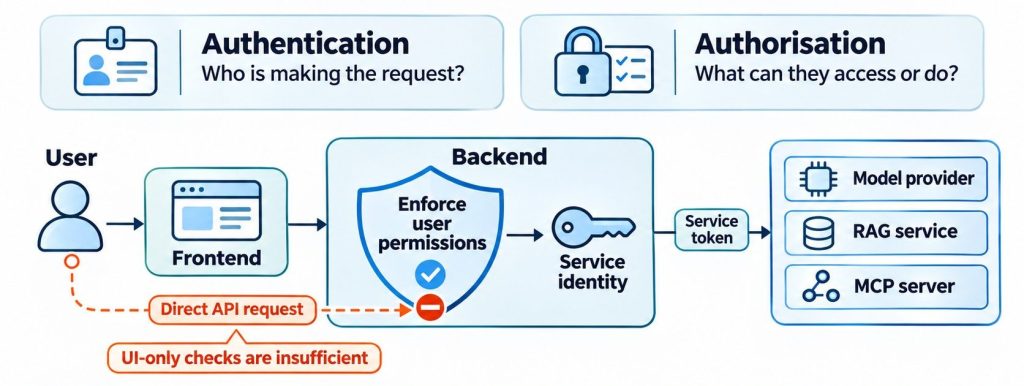
AI applications still depend on standard application security controls. Authentication confirms who is making a request. Authorisation determines what that identity is allowed to access or do. If these checks are missing or applied only in the user interface, an attacker may access AI endpoints, conversations, documents, model settings or administrative functions without permission.
AI systems also use service identities and machine-to-machine tokens. A frontend may call a backend, which then calls a model provider, RAG service or MCP server. A service-level token should not automatically grant every user the full permissions of that service. The backend must enforce the requesting user’s permissions before using its own service identity.
Attack scenarios
- Unauthenticated access to model, chat, embedding or administrative endpoints.
- Changing a conversation ID, document ID or tenant ID to access another user’s data (IDOR/BOLA).
- Using a service-level token to perform actions beyond the user’s permissions.
- Accepting expired, unsigned, incorrectly scoped or incorrectly validated tokens.
- Weak role-based access control for model configuration, prompt management or agent tools.
- Session or API key leakage through browser storage, logs or error messages.
How to test
- Map all AI-related endpoints, including chat, file upload, retrieval, model management, tool execution and administrative APIs.
- Test each endpoint without authentication and with expired, invalid or altered credentials.
- Use two or more authorised test accounts with different roles and attempt to access each other’s conversations, files and resources.
- Change object identifiers and tenant parameters to test for IDOR/BOLA vulnerabilities.
- Review token issuer, audience, expiry, signature and scope validation where applicable.
- Check whether backend services enforce the user’s permissions before using service-level credentials.
- Verify that administrative and model-management functions are restricted to authorised roles.
Security impact
Weak authentication or authorisation can expose conversations and business data, allow unauthorised model usage, enable privileged agent actions or compromise administrative functions.
Mitigation
- Preventive: Enforce authentication and object-level authorisation on the server for every request. Use least-privilege service identities, short-lived tokens, narrow audiences and scopes, and secure session management. Do not rely on hidden UI controls.
- Detective: Log identity, tenant, resource and authorisation decisions. Alert on repeated access denials, identifier tampering and unusual token use.
- Response: Revoke exposed tokens and sessions, disable compromised accounts and investigate affected resources and tenants.
Tools: Burp Suite Professional, OWASP ZAP and Postman are useful for authentication, API and access-control testing. For practical test cases covering BOLA, JWT validation, function-level access and API rate limits, see our API security testing checklist.
8. Unbounded Consumption and Model Denial of Service
What is unbounded consumption?

LLM requests can consume significant compute, memory and paid API usage. Unbounded consumption occurs when an application does not place effective limits on request volume, input size, output size, model operations or agent execution. An attacker may exploit these weaknesses to degrade availability or create unexpected operational costs.
Unlike a basic API request, one user action may trigger several model calls, retrieval operations and tool executions. An agent that repeatedly retries a failed task or calls other agents without a firm limit can create a large number of downstream operations.
Attack scenarios
- Sending repeated requests to consume model tokens or inference capacity.
- Submitting very large prompts, documents, images or audio files.
- Triggering long outputs or repeated summarisation and retrieval operations.
- Creating an agent loop in which tools or agents repeatedly call one another.
- Sending concurrent requests that exceed application or provider limits.
- Abusing expensive model routes or high-cost features without per-user quotas.
How to test
- Review request limits, token limits, file-size limits, timeouts and concurrency controls.
- Test permitted maximum input and output sizes using an agreed test environment.
- Perform authorised load testing and monitor request latency, token consumption, queue depth and infrastructure utilisation.
- Check whether limits apply per user, tenant, API key and model route.
- Test how the application handles tool retries, failed calls, recursive workflows and multi-agent hand-offs.
- Confirm that a runaway task can be stopped without affecting unrelated users.
Security impact
Successful exploitation may cause service degradation, exhausted quotas, increased cloud or model-provider costs, delayed responses or denial of service for legitimate users.
Mitigation
- Preventive: Set rate limits, token budgets, maximum input and output sizes, concurrency caps, execution timeouts and per-tenant quotas. Limit agent steps, retries and tool calls. Use circuit breakers for failing downstream services.
- Detective: Monitor token use, cost per user or tenant, request volume, latency, queue depth and repeated agent actions.
- Response: Throttle abusive clients, stop runaway jobs, apply temporary quotas and investigate unexpected cost or usage spikes.
Tools: Locust and k6 can support authorised load testing. Burp Suite and Postman can help validate API limits. Provider dashboards and application telemetry should be used to measure token and cost consumption.
9. Model Extraction and Inference API Abuse
What are model extraction and inference API abuse?
Model extraction is an attempt to approximate or reproduce a proprietary model’s behaviour by querying it and collecting its outputs. Inference API abuse is broader: it includes unauthorised or excessive use of an exposed model endpoint, misuse of API keys, scraping and attempts to access model information that should not be public.
Repeated queries may help an attacker build a substitute model or learn how a service behaves. However, not every high-volume API user is performing model extraction. Testing should distinguish ordinary abuse, credential compromise and systematic attempts to reproduce model behaviour.
Attack scenarios
- Accessing an inference endpoint without valid authentication.
- Using exposed API keys to consume a model service.
- Submitting large sets of carefully varied queries to collect model responses.
- Abusing debug or metadata endpoints to learn model versions or configuration details.
- Attempting to access model-management or fine-tuning functions through inference credentials.
How to test
- Identify public and internal inference endpoints and the authentication method used by each.
- Check whether API keys are exposed in client-side code, mobile applications, logs or error messages.
- Review quotas, usage limits and permissions for inference, fine-tuning and model-management operations.
- Check whether error messages or metadata expose unnecessary model and infrastructure details.
- Use controlled query patterns to verify whether unusual volume or systematic extraction-like activity is detected and limited.
- Confirm that inference credentials cannot access administrative or training functions unless explicitly authorised.
Security impact
Model extraction may reduce the value of proprietary model capabilities. API abuse may lead to financial loss, service disruption, data exposure or unauthorised use of paid model resources.
Mitigation
- Preventive: Protect inference endpoints with strong authentication, scoped API keys, rate limits and quotas. Separate inference access from model-management and fine-tuning permissions. Avoid exposing internal metadata.
- Detective: Monitor unusual query volume, repeated prompt variations, unexpected geographic or account patterns and abnormal token consumption.
- Response: Revoke compromised keys, restrict suspicious clients, investigate query patterns and review possible model or data exposure.
Tools: Burp Suite, OWASP ZAP and Postman can test endpoint exposure and API controls. Provider usage logs and analytics are important for identifying unusual query behaviour.
10. Training Data, Model and Memory Poisoning
What is data and model poisoning?
Data poisoning occurs when an attacker introduces manipulated or misleading records into data used to train, fine-tune, evaluate or otherwise influence a model. The altered data may change model behaviour, reduce accuracy or introduce a hidden trigger that causes a particular response under specific conditions.
AI applications may also store persistent agent memory, conversation summaries or feedback that is reused in later sessions. If an attacker can change this information without proper checks, future model interactions may be influenced by attacker-controlled content. This is often described as memory or context poisoning.
RAG document poisoning is related but should also be tested at the retrieval layer. A malicious document may affect a response when retrieved even though the underlying model weights have not changed.
Attack scenarios
- Adding unauthorised records to a training or fine-tuning dataset.
- Manipulating feedback or user ratings that are later used to improve a model.
- Introducing records designed to create a backdoor or targeted model behaviour.
- Changing persistent agent memory so that future sessions follow false instructions.
- Modifying evaluation data to hide model failures or create misleading test results.
- Changing a RAG knowledge source so that retrieved answers favour attacker-controlled content.
How to test
- Identify who can upload, modify, approve and delete training, fine-tuning, evaluation and feedback data.
- Review dataset provenance, approval records, access logs and version history.
- Verify integrity checks for datasets, model weights, adapters and other model artefacts.
- Use controlled test data in an approved environment to compare model behaviour before and after a data change.
- Test whether one user can alter another user’s persistent memory or shared context.
- Check whether deleted or corrected memory and data are removed from the systems that reuse them.
- Review evaluation processes for signs that test data or expected outputs can be changed without approval.
Security impact
Poisoning may reduce model reliability, introduce targeted behaviour, influence future agent decisions, undermine evaluations or cause users to receive manipulated information.
Mitigation
- Preventive: Restrict write access to datasets, memory stores and model artefacts. Validate data sources, track provenance and maintain versioned datasets. Require review before training or fine-tuning changes are promoted.
- Detective: Monitor data changes, unusual feedback patterns, model behaviour shifts and unexplained evaluation changes. Compare results against trusted baseline tests.
- Response: Isolate suspicious data, restore a verified dataset or model version, clear affected memory and re-evaluate the model before returning it to service.
Tools: Dataset validation scripts, version control, model registry audit logs and evaluation frameworks such as Giskard can support testing. Hashes help detect file changes, but do not prove that the original data was trustworthy.
11. AI Supply-Chain and Third-Party Component Risks
What is an AI supply-chain risk?
AI applications depend on components developed or hosted by other parties. These may include pretrained models, model weights, fine-tuning adapters, datasets, Python packages, container images, plugins, external APIs and MCP servers. A weakness or compromise in one component can affect the application that uses it.
For example, an application may download a model from a public repository without verifying its source or integrity. A compromised package or model artefact may introduce malicious code or behaviour into the development or deployment process. Third-party tools can also receive access to sensitive data or privileged actions.
Attack scenarios
- Loading a tampered or untrusted model file.
- Installing a malicious or compromised Python package used by an AI pipeline.
- Using an unreviewed MCP server, plugin or agent tool.
- Downloading datasets or model adapters from unverified repositories.
- Compromising a model registry, package repository or CI/CD pipeline.
- Using an outdated dependency with a known vulnerability.
How to test
- Build an inventory of models, datasets, adapters, packages, containers, plugins, MCP servers and external services.
- Review where each component came from and who can publish or update it.
- Verify model and package hashes or signatures where the publisher provides them.
- Review dependency lock files, software bills of materials (SBOMs), vulnerability reports and update procedures.
- Check permissions on model registries, artifact stores and CI/CD pipelines.
- Assess whether third-party tools receive only the data and permissions required for their function.
- Verify that model and package updates are reviewed and tested before production deployment.
Security impact
A compromised component may introduce malicious code, expose data, alter model behaviour, create unauthorised access or compromise the build and deployment process.
Mitigation
- Preventive: Use trusted registries, pin dependency versions, verify signatures and hashes, restrict publishing permissions and review third-party tools before integration. Maintain an SBOM and keep components patched.
- Detective: Scan dependencies and container images, monitor registry changes and alert on unexpected model or package updates.
- Response: Quarantine affected components, revoke compromised publishing credentials, rebuild from trusted sources and review downstream deployments.
Tools: Trivy, Grype, Syft and Checkov can support dependency, container and infrastructure checks. These tools should be combined with provenance, signature and access-control reviews.
12. Improper Output Handling and Unsafe Execution
What is improper output handling?
Improper output handling occurs when an application trusts model-generated content and passes it to another component without the validation, encoding or security checks required by that destination. LLM output is untrusted input. It should not be treated as safe simply because it was generated by the application’s own model.
The risk depends on where the output is used. If generated HTML is rendered without context-appropriate encoding, it may create a cross-site scripting (XSS) issue. If generated text is concatenated into a SQL statement or shell command, it may create an injection flaw. If an agent fetches a model-generated URL, the application may introduce server-side request forgery (SSRF) risk unless it validates the destination and controls network access.
Attack scenarios
- Rendering model-generated HTML or Markdown without safe sanitisation.
- Using model-generated values in SQL statements without parameterised queries.
- Passing generated commands or code to a shell or execution environment.
- Allowing an agent to fetch arbitrary URLs suggested by model output.
- Using generated file paths, template expressions or API parameters without validation.
- Trusting a model’s structured response without checking the values against business rules.
How to test
- Trace model output through the application and identify every downstream sink, such as HTML rendering, database queries, shell execution, file access and HTTP requests.
- Use harmless test strings to check whether generated HTML is encoded or sanitised before rendering.
- Review database code to confirm that generated values are passed through parameterised queries rather than concatenated into SQL.
- Check whether generated URLs are restricted to approved schemes, hosts and network destinations.
- Verify that code or commands generated by the model cannot run without a controlled execution boundary and explicit authorisation.
- Test whether schema-valid outputs can still cause an unauthorised business action.
Security impact
Depending on the downstream component, unsafe output handling may lead to XSS, SQL injection, command injection, SSRF, unauthorised file access or unintended business operations. The vulnerability is in the application’s handling of the output, not simply in the model’s ability to generate text.
Mitigation
- Preventive: Treat model output as untrusted. Apply context-specific output encoding, HTML sanitisation where required, parameterised database queries and strict URL validation. Avoid executing generated code directly. Use allowlisted operations and deterministic business rules for sensitive actions.
- Detective: Log output-processing failures, blocked destinations, rejected parameters and unexpected execution attempts.
- Response: Disable the affected processing path, investigate any downstream execution and remediate the vulnerable sink.
Tools: Burp Suite and OWASP ZAP can help test web and API behaviour. Semgrep and CodeQL can help identify unsafe data flows in source code. Manual code review is important for confirming whether model output reaches a sensitive sink.
13. Insecure File Upload and Document Processing
What are file-processing risks in AI applications?
AI applications often accept PDFs, Word documents, spreadsheets, images, audio files, archives and other uploads. These files may be parsed, converted, passed through OCR or speech-to-text, split into chunks and sent to a model or RAG pipeline.
Each processing step can introduce traditional application vulnerabilities. A file extension or MIME type alone does not prove that a file is safe. Vulnerable parsers, unsafe archive extraction, excessive file sizes, weak temporary storage permissions or public upload locations can expose the application to attack.
Attack scenarios
- Uploading a file whose extension or content type does not match its actual format.
- Exploiting a vulnerable PDF, image, office-document or media parser.
- Submitting oversized or highly compressed files that consume excessive processing resources.
- Accessing another user’s uploaded documents through predictable file paths or identifiers.
- Exposing temporary files, extracted text or generated previews.
- Allowing a document to enter a RAG index before security checks or access metadata are applied.
How to test
- Identify accepted file types, size limits, parser libraries, conversion services and storage locations.
- Check whether the server validates file content and format instead of trusting the extension or client-provided MIME type.
- Use approved benign test files to assess file-size limits, archive handling and parser error behaviour.
- Review whether uploaded files and extracted content are stored outside public web paths and protected by per-user access controls.
- Check whether temporary files are deleted and whether document deletion also removes derived text and indexed chunks.
- Verify that files are scanned or isolated before parsing and before they are made available to an AI model.
Security impact
Weak file processing may lead to denial of service, sensitive file exposure, exploitation of parser vulnerabilities, unauthorised document retrieval or malicious content entering an AI workflow.
Mitigation
- Preventive: Allow only required file formats, validate file content, enforce size and processing limits, patch parsers and isolate document-processing services. Store files privately with random identifiers and strict access controls. Treat extracted text as untrusted.
- Detective: Monitor suspicious uploads, parser errors, file-size anomalies and unexpected access to temporary storage.
- Response: Quarantine suspicious files, stop affected processing jobs, remove unsafe content from indexes and review parser or storage logs.
Tools: ClamAV can help scan files for known malware. Semgrep and dependency scanners can help review processing code and libraries. Malware scanning does not replace parser isolation or secure file handling.
14. Insecure AI Infrastructure and Deployment
What are AI infrastructure security risks?
AI services depend on infrastructure such as model-serving endpoints, GPU instances, containers, Kubernetes clusters, cloud storage, secrets managers, orchestration platforms and monitoring systems. Weak configuration in any of these components can expose models, data or administrative functions.
AI infrastructure may also contain model weights, training datasets, API credentials and internal service endpoints. If these assets are publicly accessible or protected by overly broad cloud permissions, an attacker may gain access beyond the AI application itself.
Attack scenarios
- Publicly exposed inference, model-management or orchestration interfaces.
- Cloud storage containing model files, datasets, logs or backups with weak permissions.
- Secrets exposed in environment variables, container images, notebooks or logs.
- Over-privileged cloud service accounts or Kubernetes workloads.
- Unpatched model-serving frameworks, orchestration libraries or container images.
- Weak network segmentation between model services, databases and internal systems.
How to test
- Identify model endpoints, management consoles, storage services, orchestration APIs and administrative interfaces.
- Check whether internal services are unintentionally exposed to the public internet.
- Review cloud IAM roles, service accounts, Kubernetes permissions and network security rules.
- Inspect container images, dependencies, deployment manifests and CI/CD configurations for insecure settings or known vulnerabilities.
- Review how API keys, database credentials and model-provider secrets are stored and accessed.
- Check access controls and encryption for model artefacts, datasets, logs and backups.
Security impact
Infrastructure weaknesses may allow attackers to access model services, steal data or model artefacts, misuse cloud resources, obtain service credentials or compromise connected systems.
Mitigation
- Preventive: Harden model-serving infrastructure, restrict management interfaces, apply least-privilege cloud roles, segment networks and store credentials in a secrets manager. Patch dependencies and use secure container images.
- Detective: Monitor cloud audit events, administrative access, network activity, secret access and changes to model-serving deployments.
- Response: Isolate compromised workloads, revoke exposed secrets, rebuild from trusted images and investigate access to model artefacts and data stores.
Tools: Nmap can help identify exposed services. Trivy can scan containers and dependencies, while Checkov can review infrastructure-as-code configurations. Burp Suite and OWASP ZAP can assess application-facing services.
15. AI Misinformation and Output Integrity
What is AI misinformation?
LLMs can produce incorrect, incomplete or fabricated information while presenting it in a confident tone. This behaviour is often called a hallucination. It may occur when the model lacks relevant information, retrieves poor-quality sources, misunderstands a question or generates an answer that is not supported by the available evidence. An incorrect answer is not automatically an exploitable security vulnerability; it becomes a security concern when an attacker can manipulate it or when people or automated systems rely on it for important decisions or actions.
Misinformation becomes a security and operational risk when users or automated workflows trust the response without verification. For example, an AI agent may act on an incorrect account status, a fabricated security recommendation or a false statement retrieved from an untrusted source.
Attack scenarios
- Returning fabricated facts, package names, references or technical recommendations.
- Presenting unsupported information as if it came from a trusted document.
- Manipulating retrieved sources so that the model returns misleading answers.
- Providing an incorrect security status that causes a user to take an unsafe action.
- Passing an unverified answer from one agent to another as trusted information.
- Allowing an AI workflow to make a sensitive decision using generated content without validation.
How to test
- Prepare a set of questions with known, verified answers and include cases where the correct answer is not present in the knowledge base.
- Check whether the model clearly indicates when it does not have enough information.
- Verify that citations and source links actually support the claims made in the response.
- Introduce controlled conflicting or outdated test documents and assess how the RAG system handles them.
- Check whether outputs used for security-sensitive or business-critical actions are verified by trusted systems.
- Test whether downstream agents treat another agent’s response as untrusted input rather than authoritative evidence.
Security impact
Incorrect outputs may lead to unsafe decisions, incorrect security fixes, financial or operational errors, loss of trust and automated actions based on false information.
Mitigation
- Preventive: Ground important answers in approved sources. Require validation for security-critical facts and actions. Display source references where available and make uncertainty clear when evidence is missing.
- Detective: Evaluate responses against trusted test sets, monitor unsupported claims and review high-impact decisions.
- Response: Correct inaccurate content, stop affected automated actions, notify impacted users where needed and update the underlying source or evaluation process.
Tools: Ragas and Giskard can support RAG and model-response evaluation. Human review and verification against trusted records remain necessary for high-impact decisions.
16. Safety Guardrail Bypass
What is safety guardrail bypass?
AI applications often use safety policies, classifiers, moderation services and model-level safeguards to reduce harmful or disallowed outputs. A guardrail bypass occurs when an attacker causes the system to produce content or perform behaviour that its safety controls are intended to prevent.
Jailbreaking is commonly used to describe attempts to make a model ignore its safety restrictions. It is closely related to prompt injection, but the testing objective is different: prompt-injection testing examines how untrusted instructions influence the model, while safety testing evaluates whether the system consistently applies its content and action policies.
A refusal message alone does not prove that an application is secure. Assess whether the model, application logic and connected tools all enforce the required restrictions.
Attack scenarios
- Using role-play or fictional scenarios to bypass configured safety rules.
- Splitting a restricted request across multiple conversation turns.
- Changing language, formatting or encoding to evade safety checks.
- Obtaining an allowed-looking response that still contains restricted content.
- Causing an agent to perform a restricted action even when the model’s text response appears safe.
- Testing whether safety controls behave differently across text, image, audio and other supported inputs.
How to test
- Document the application’s safety policy and the actions or content it must restrict.
- Test direct requests, role-play, multi-turn conversations and variations in language and formatting using approved test cases.
- Check for both false compliance and false refusals: the system should block prohibited behaviour without unnecessarily blocking legitimate use.
- Test safety controls across supported input types and connected tools.
- Verify that backend permissions and business rules prevent restricted actions even if the model produces an unsafe instruction.
- Record the exact input, model response, tool calls and final application behaviour for reproducibility.
Security impact
A safety failure may expose users to harmful content, enable prohibited operations, trigger unauthorised tool use or violate organisational policy. The actual impact depends on the application’s purpose and connected capabilities.
Mitigation
- Preventive: Use layered safeguards, including model-level controls, input and output checks, application-side policy enforcement and least-privilege tool permissions. Do not rely on system prompts alone to enforce access control or prevent sensitive actions.
- Detective: Monitor policy violations, unsafe outputs, repeated bypass attempts and unexpected tool actions. Run regression tests when prompts, models or integrations change.
- Response: Restrict affected functionality, review the failed test cases, update controls and repeat adversarial testing before restoring the feature.
Tools: Promptfoo, PyRIT and garak can support adversarial and safety evaluations. Their results should be reviewed in the context of the application’s policy and actual capabilities.
How to perform an AI security assessment
A useful AI security assessment should follow the data and action paths through the application. Testing only the chat interface may miss weaknesses in model APIs, RAG retrieval, service identities, vector databases and connected tools.
1. Define scope and identify AI components
Confirm which applications, model providers, endpoints, user roles, data sources and integrations are in scope. Identify whether the application uses RAG, persistent memory, agents, MCP servers, file processing, external APIs or fine-tuning. Agree on test accounts, test data, permitted actions and any restrictions before testing.
2. Map data flows and trust boundaries
Document how information moves from the user to the application, model, retrieval service, vector database and tools. Identify which components process sensitive data and which components can perform state-changing actions. Mark every place where untrusted content enters the model context or crosses a service boundary.
3. Test application and model controls
Assess authentication, authorisation, session management, API security, prompt injection, sensitive data exposure, output handling and resource limits. For RAG systems, test document permissions and retrieval isolation. For agents, test tool permissions, action validation and human approval controls.
4. Validate security impact
Do not report a model response as a critical vulnerability without checking what it enables. Confirm whether the issue exposes real data, bypasses a permission check, triggers a tool call or affects a downstream component. Use synthetic data and safe proof-of-concept actions wherever possible.
5. Review logs, evidence and remediation
Collect the affected endpoint, user role, request and response, model or tool action, retrieved record identifiers and relevant timestamps. Avoid storing real secrets or personal data in the report unless required and approved. Retest after remediation to confirm that the control works at the application or infrastructure layer.
AI security testing tools
The following tools can support different parts of an AI security assessment. No single tool can identify every AI security weakness, and automated results should be validated manually.
| Tool | Typical use |
|---|---|
| Promptfoo | Prompt testing, adversarial evaluations and regression testing. |
| PyRIT | AI red teaming and automated adversarial testing workflows. |
| garak | LLM vulnerability probes and model behaviour testing. |
| Burp Suite | Web application, API, authentication and authorisation testing. |
| OWASP ZAP | Web and API security testing. |
| Postman | API request testing and validation. |
| Ragas | RAG retrieval and response-quality evaluation. |
| Giskard | AI model and RAG evaluation. |
| Microsoft Presidio | Detection and protection of personal information. |
| Trivy | Container, dependency and configuration scanning. |
| Checkov | Infrastructure-as-code security checks. |
| Locust / k6 | Authorised load and performance testing. |
| Semgrep / CodeQL | Source-code analysis and unsafe data-flow review. |
AI security frameworks and references
Use established frameworks to structure threat modelling, testing and risk management. They provide useful guidance, but they do not replace an assessment of the application’s actual architecture and business requirements. The 16 areas in this guide are a practitioner-focused grouping, not a verbatim copy of one framework or a severity ranking. They combine the current OWASP LLM and agentic guidance with additional application, API, file-processing and infrastructure checks.
What Google SAIF adds: Google’s Secure AI Framework (SAIF) looks at security across four connected areas: data, infrastructure, models and applications. Its control guidance includes training-data management, input and output validation, least-privilege agent permissions, agent observability, red teaming, vulnerability management and threat detection. This is useful when building an assessment plan because it prevents teams from focusing only on the model while ignoring the services and data around it. See the SAIF map and SAIF security controls.
How to use these references: OWASP helps identify common application and agent threats; Google SAIF maps risks to components and controls; NIST provides a wider risk-management approach; and MITRE ATLAS helps describe adversary behaviours and techniques. Use them together, then tailor the test cases to the system you are assessing.
- OWASP GenAI Top 10 for LLM Applications 2026: covers prompt injection, sensitive information disclosure, excessive agency, supply chain, poisoning, unbounded consumption, misinformation, hidden context exposure, vector and embedding weaknesses, and improper output handling.
- OWASP Top 10 for Agentic Applications 2026: provides additional guidance for risks introduced by autonomous and agentic systems.
- Google Secure AI Framework (SAIF): maps AI risks and controls across data, infrastructure, models and applications.
- Google SAIF security controls: describes controls such as data management, agent permissions, observability, red teaming and vulnerability management.
- NIST AI 600-1: Generative Artificial Intelligence Profile: provides a risk-management resource for organisations developing, deploying or using generative AI.
- MITRE ATLAS: a knowledge base of adversary tactics and techniques involving AI-enabled systems and machine-learning technologies.
Frequently asked questions about AI security risks
What are the most common AI security risks?
Common AI security risks include prompt injection, sensitive information disclosure, excessive agent permissions, data and model poisoning, unbounded resource consumption, insecure output handling and weaknesses in RAG retrieval. The risks that matter most depend on how the AI application is built and what data or tools it can access.
What is the difference between direct and indirect prompt injection?
Direct prompt injection is supplied through the user’s input. Indirect prompt injection is placed in external content, such as a document, email, web page or tool response, that the AI system later processes. Both can influence model behaviour, but they enter the system through different sources.
How do you perform penetration testing on an AI application?
Start by mapping the model endpoints, APIs, data sources, user roles, retrieval components and connected tools. Then test prompt injection, data exposure, RAG permissions, agent actions, authentication, output handling, file processing and infrastructure. Validate each finding by confirming its effect on application security and collecting safe, reproducible evidence.
How can organisations secure AI agents?
Give each agent only the tools and permissions required for its task. Enforce authorisation in the backend, validate every tool request, use scoped credentials, limit execution steps and require human approval for sensitive or irreversible actions. Log agent activity so that tool calls and decisions can be audited.
Does prompt injection always lead to a security breach?
No. Prompt injection is an attempt to influence model behaviour. Its impact depends on what the model can access and what actions the application allows it to perform. A prompt injection may have limited impact in a read-only chatbot, but it can be more serious when an agent has access to private data, external communication or state-changing tools.
Are AI security risks limited to LLMs?
No. AI security risks can affect machine-learning models, training data, model-serving infrastructure, APIs, vector databases, agent frameworks, file-processing services and third-party integrations. An assessment should cover the full AI lifecycle and supporting application environment.
Conclusion
AI security requires more than testing whether a model gives a safe or correct response. LLMs, RAG applications and AI agents depend on APIs, identity services, data stores, retrieval systems, external tools and infrastructure. Weaknesses in any of these components can affect the security of the complete application.
For penetration testers and security teams, the most useful approach is to trace how data enters the model, how the model uses external information and tools, and which application controls enforce the final action. Prompt-level safeguards are not a replacement for server-side authorisation, least privilege, safe output handling and monitoring.
Organisations should use this risk list as a starting point for threat modelling and authorised security testing, then adapt the assessment to the AI application’s architecture, data sensitivity and business impact.
About the Author